How to Build an AI Second Brain. Guide from Andrej Karpathy.
Most people use AI the same way every time. Upload a document. Ask a question. Get an answer. Close the tab.
Tomorrow, you upload the same document. Ask a slightly different question. The AI starts from scratch. No memory of yesterday. No accumulated understanding. No synthesis across everything you’ve ever asked.
This is how NotebookLM works. It’s how ChatGPT file uploads work. It’s how most RAG systems work. And it’s fundamentally broken for anyone trying to build knowledge over time.
Andrej Karpathy just proposed a better way. And it might be the most useful AI workflow I’ve seen this year.
What Karpathy Proposed
In two posts on X that went massively viral last week, Karpathy outlined a pattern he’s calling the LLM Wiki. The idea is simple but powerful:
Instead of having your AI re-read raw documents every time you ask a question, have the AI incrementally build and maintain a persistent wiki: a structured, interlinked collection of markdown files that compounds over time.
When you add a new source, the AI doesn’t just index it for later retrieval. It reads it, extracts the key information, and integrates it into the existing wiki updating entity pages, revising topic summaries, noting where new information contradicts old claims, and strengthening the overall synthesis.
The difference from what most people do today:
RAG (what you’re doing now) LLM Wiki (Karpathy’s approach) When you add a source It gets chunked and embedded for later retrieval The AI reads it, summarizes it, updates every relevant page in your wiki When you ask a question AI searches for relevant chunks, pieces together an answer from scratch AI reads the pre-built wiki pages, gives you an answer with citations already in place Over time Nothing accumulates. Every query starts from zero. The wiki gets richer. Cross-references build up. Contradictions are flagged. Maintenance None needed (but quality doesn’t improve either) The AI handles all maintenance, and that’s the whole point.
Karpathy put it perfectly: “Humans abandon wikis because the maintenance burden grows faster than the value. LLMs don’t get bored, don’t forget to update a cross-reference, and can touch 15 files in one pass.”
The Architecture: Three Layers
The pattern has three layers, and understanding them is key to making this work.
-
Raw Sources — Your curated collection of source documents. Articles, PDFs, notes, clipped web pages. These are immutable. The AI reads from them but never modifies them. This is your source of truth.
-
The Wiki — A directory of AI-generated markdown files. Summaries, entity pages, concept pages, comparisons, an index. The AI owns this layer entirely. It creates pages, updates them when new sources arrive, maintains cross-references, and keeps everything consistent. You read it; the AI writes it.
-
The Schema — A configuration file (CLAUDE.md for Claude Code) that tells the AI how the wiki is structured, what conventions to follow, and what workflows to execute when ingesting sources, answering questions, or maintaining the wiki. This is what makes the AI a disciplined wiki maintainer rather than a generic chatbot.
Karpathy’s metaphor is perfect: “Obsidian is the IDE. The LLM is the programmer. The wiki is the codebase.”
How to Build One (Step by Step)
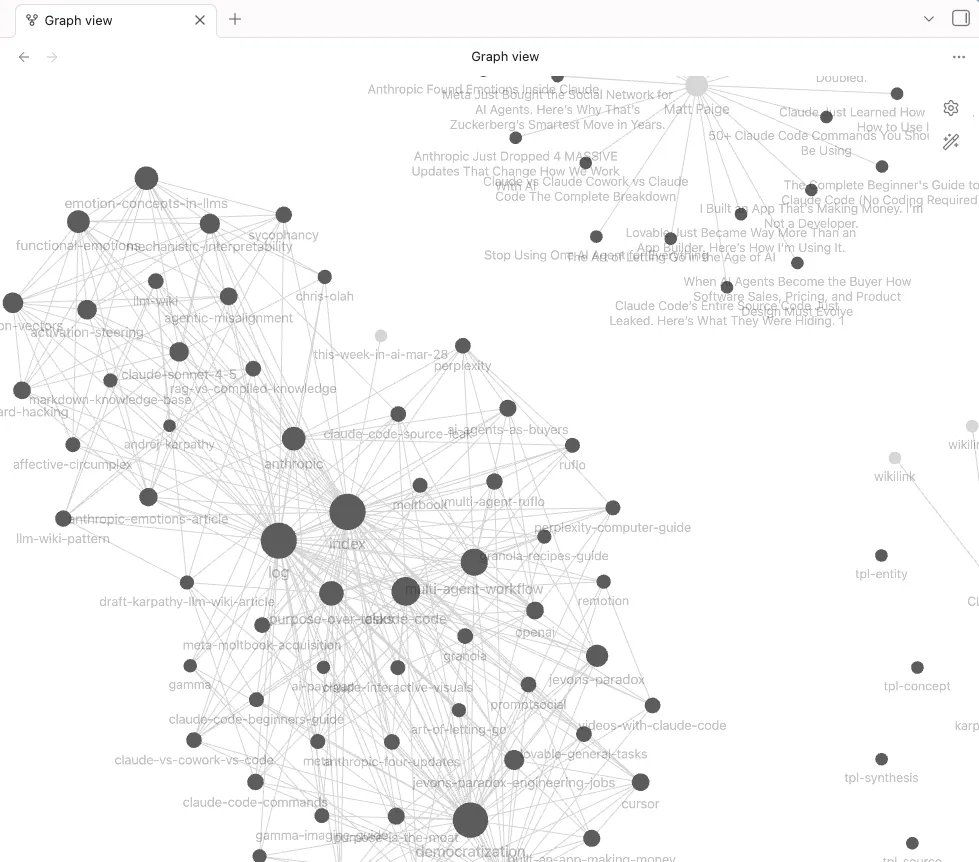
To test this out, I decided to go all in. I loaded every article I’ve ever published into an Obsidian vault using this exact structure, with Claude Code as the engine. Within an hour, I had 56 interconnected wiki pages - every article broken down into its thesis, key claims, data cited, products covered, and recurring themes. All cross-referenced. All queryable. It’s now the foundation I use to research and draft new articles.
Here’s exactly how to set this up with Claude Code and Obsidian. The whole thing takes about 15 minutes.
What You Need
-
Claude Code installed and running.
-
Obsidian - download free from obsidian.md
-
Obsidian Web Clipper - install from the Chrome Web Store
Step 1: Create Your Obsidian Vault
Open Obsidian, click “Create new vault,” and give it a name. This is just a folder on your computer where all your markdown files will live.
Step 2: Give Claude Code the Karpathy Gist
Open Claude Code pointed at your Obsidian vault folder. Then paste Karpathy’s gist and tell Claude Code to implement it:
“Here is Andrej Karpathy’s LLM Wiki pattern. Please implement this as my personal knowledge base in this Obsidian vault. Create the full directory structure, the CLAUDE.md schema file, the index, the log, and all templates. Use his gist as the first source to ingest.”
Then paste the full content from Karpathy’s gist.
That’s it. Claude Code will:
-
Create the folder structure (raw/, wiki/sources/, wiki/entities/, wiki/concepts/, etc.)
-
Write a complete CLAUDE.md schema file with all the rules, page types, and workflows
-
Create the index and activity log
-
Ingest the gist itself as the first source
-
Build out entity and concept pages from the gist content
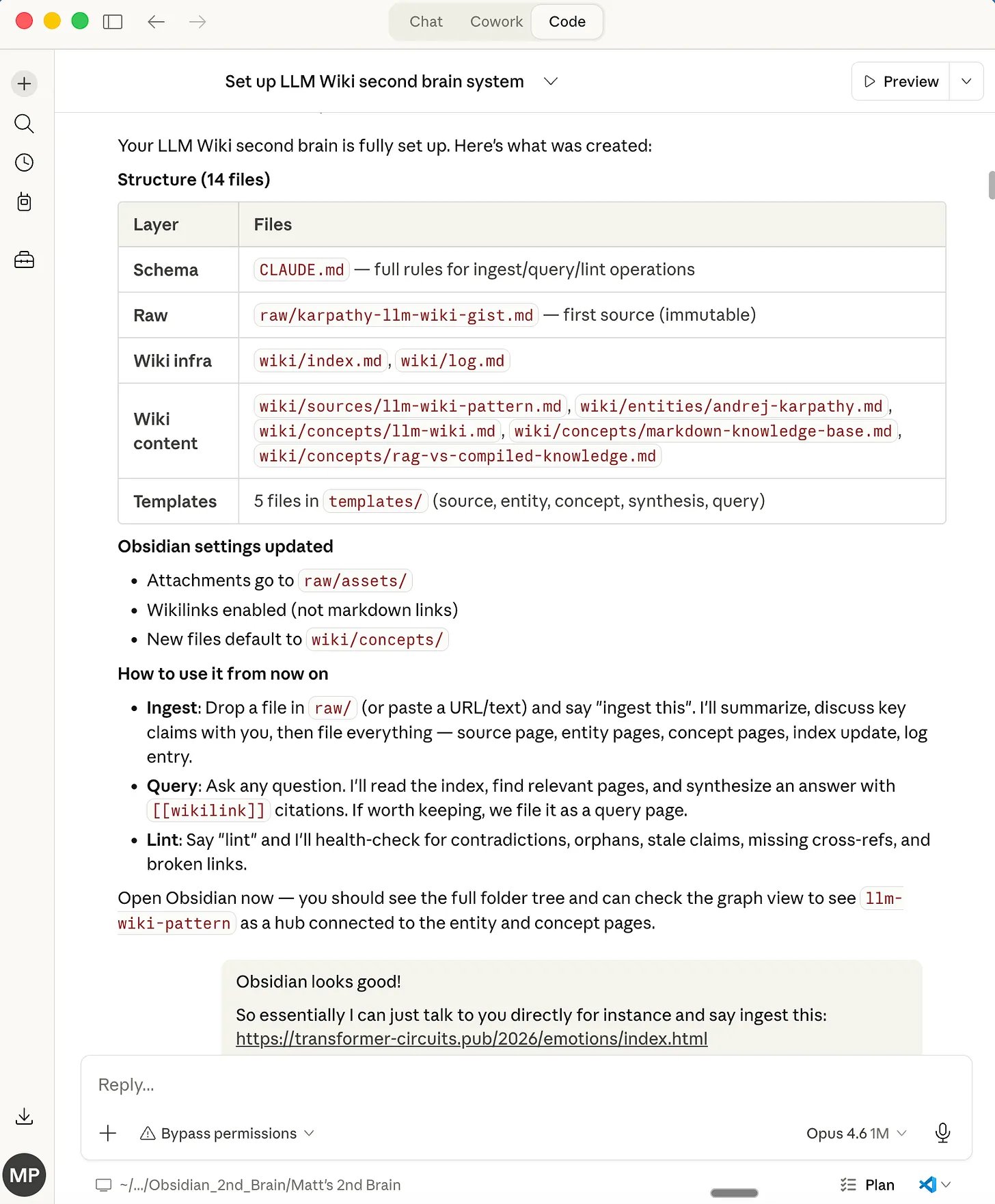
When it’s done, switch over to Obsidian. You’ll see the full wiki structure in the file explorer and your first set of interlinked pages in the graph view.
Step 3: Configure the Obsidian Web Clipper
This is how you’ll get sources into your wiki fast.
-
Open the Obsidian Web Clipper extension settings
-
Set the default vault to the one you just created
-
Set the default folder to raw/ - this is where clipped articles will land
-
Now when you’re reading an article you want to save, click the clipper icon and it drops a clean markdown copy into your raw folder
Step 4: Ingest Your First Real Source
Find an article, research paper, or document relevant to whatever you’re building this wiki for. Clip it with the Web Clipper (or paste a URL directly to Claude Code).
Then tell Claude Code:
“Ingest the new file in raw/”
Claude Code will read the source, present a summary and key claims for your review, then file everything: a source summary page, entity pages for people and products mentioned, concept pages for ideas covered, all cross-referenced and added to the index.
One source. Five to fifteen wiki pages updated. That’s the compounding effect Karpathy is talking about.
Step 5: Query Your Wiki
Now ask a question:
“What do we know about [topic] across all sources?”
Claude Code reads the index, pulls the relevant pages, and synthesizes an answer with [[wikilink]] citations back to specific sources. If the answer is substantial, it can file it as a new wiki page so your explorations compound too.
Step 6: Keep It Healthy
Periodically, tell Claude Code to run a health check:
“Lint the wiki”
It’ll scan for contradictions between pages, orphan pages with no links, stale claims that newer sources have superseded, and missing cross-references. It reports everything organized by severity and offers to fix each issue.
Why This Is Better Than What You’re Doing Now
The core insight is one of those things that seems obvious once you hear it: the bottleneck to maintaining a useful knowledge base has never been the reading or the thinking. It’s the bookkeeping.
Updating cross-references. Keeping summaries current. Noting when new data contradicts old claims. Maintaining consistency across dozens of pages. That’s the work humans abandon. And it’s exactly what LLMs are built for.
The wiki stays maintained because the cost of maintenance is near zero.
And because it’s just a folder of markdown files, you get version history with git, beautiful graph visualization in Obsidian, and full portability. No vendor lock-in, no proprietary database, no subscription beyond Claude.
5 Use Cases That Make This Worth Building
Karpathy describes this as a general-purpose pattern. Here are five specific ways to use it that go beyond “I want to organize my notes.”
- A Newsletter Editorial Brain
This is how I’m using it. Every article I’ve published gets ingested. Not just stored, but broken down into structured pages tracking my thesis, key claims, data I cited, products I covered, and recurring themes.
When I sit down to write a new article, I don’t start from scratch. I ask the wiki: “What have I already written about this topic? What data do I have? What’s the fresh angle? How would you structure this based on my previous writings?” The wiki gives me a contextual brief drawn from everything I’ve ever published, with citations. It prevents me from repeating myself, surfaces connections I’d forgotten, and tracks how my arguments evolve over time.
The compounding effect is real. After 20+ ingested articles, the wiki knows my beat better than I remember it.
- Deep Research Over Weeks or Months
Going deep on a topic: AI safety, climate tech, competitive analysis in your industry? Ingest every paper, article, and report as you find them. The wiki doesn’t just store them. It builds a synthesis that evolves with each new source.
After 15 sources, you have entity pages for every researcher and company, concept pages that track how ideas connect and where sources disagree, and a living overview that reflects everything you’ve read. Ask a question that requires synthesizing five documents and the wiki already has the answer because the synthesis was done incrementally, not on the fly.
- A Team Knowledge Base Fed by Slack, Calls, and Docs
This is where the pattern gets powerful for business teams. Feed it Slack threads from product channels, meeting transcripts from Granola or Fireflies, customer call recordings, project documents, and internal strategy decks. The wiki builds entity pages for every client, every project, every competitor updated automatically as new material comes in.
A sales team could ingest every discovery call transcript. Over a quarter, the wiki surfaces patterns: “The top three objections prospects raised this quarter were X, Y, and Z” with citations back to specific calls. A product team could feed in user research sessions and the wiki tracks feature requests, pain points, and sentiment shifts across dozens of conversations. No one on the team has to do the maintenance. The wiki stays current because the AI does the work that no one wants to do.
- Business and Competitive Intelligence
Feed it customer call transcripts, competitor blog posts, industry reports, and internal strategy docs. The wiki builds entity pages for every competitor, tracks what they’ve announced, and surfaces patterns across dozens of sources.
“What are the top three objections prospects raised this quarter?” becomes a queryable question with cited answers, not a vague memory from your last team meeting.
- Course Notes and Self-Education
Taking an online course, a certification program, or just going deep on a skill? Ingest each lecture, reading, or exercise. The wiki tracks concepts as they build on each other, flags when later material contradicts or updates earlier material, and gives you a personal reference that’s organized by how you learned it, not how the instructor structured it.
The Bigger Picture
If you’ve been following the AI space, you know the prevailing approach to documents has been RAG: upload everything, let the AI search through it at query time, generate an answer. It works. But Karpathy is pointing at something different. Something that treats knowledge as a compounding asset rather than a retrieval problem.
The idea traces back to Vannevar Bush’s Memex from 1945… a personal, curated knowledge store where the connections between documents are as valuable as the documents themselves. Bush’s vision was closer to this than to what the web became. The part he couldn’t solve was who does the maintenance. Now we have an answer.
The human’s job is to curate sources, direct the analysis, ask good questions, and think about what it all means.
The LLM’s job is everything else.
/ If this was useful - follow /
my telegram channel: https://t.me/+ygATQAt9sUM1N2U6