Grok Bot vs Hermes vs OpenClaw vs Buzz + How I fully automated my X content with Grok Bot
Grok Bot showed up, and most people are going to use maybe 10 percent of what it can actually do. They'll type a question into it like it's just another chatbot, read the answer, and move on.
The other 90 percent – the part where it logs into your real accounts, runs on its own computer, and finishes real work while you're asleep – is the part almost nobody touches on day one.
I spent a week pushing past that first 10 percent, using it to run my X account and comparing it head to head with Buzz, OpenClaw, and Hermes. Here's what changes once you actually turn the rest of it on.
What Grok Bot actually is?
Grok Bot @bot · Aug 11 Introducing Grok Bot, now in early beta.
Bots are AI teammates that do real work for you. They sign in to your tools, use them just like you do, and come back with finished work. The media could not be played. Reload 3.1K 7.5K 36K 56M
At first glance, Grok Bot looks like nothing special – a messenger-style window with a list of names down one side and a chat thread on the other. So the first day usually plays out the way it does with any chat app: you type something, you read the reply, you type again. Nothing about the interface hints at what's actually happening behind it.
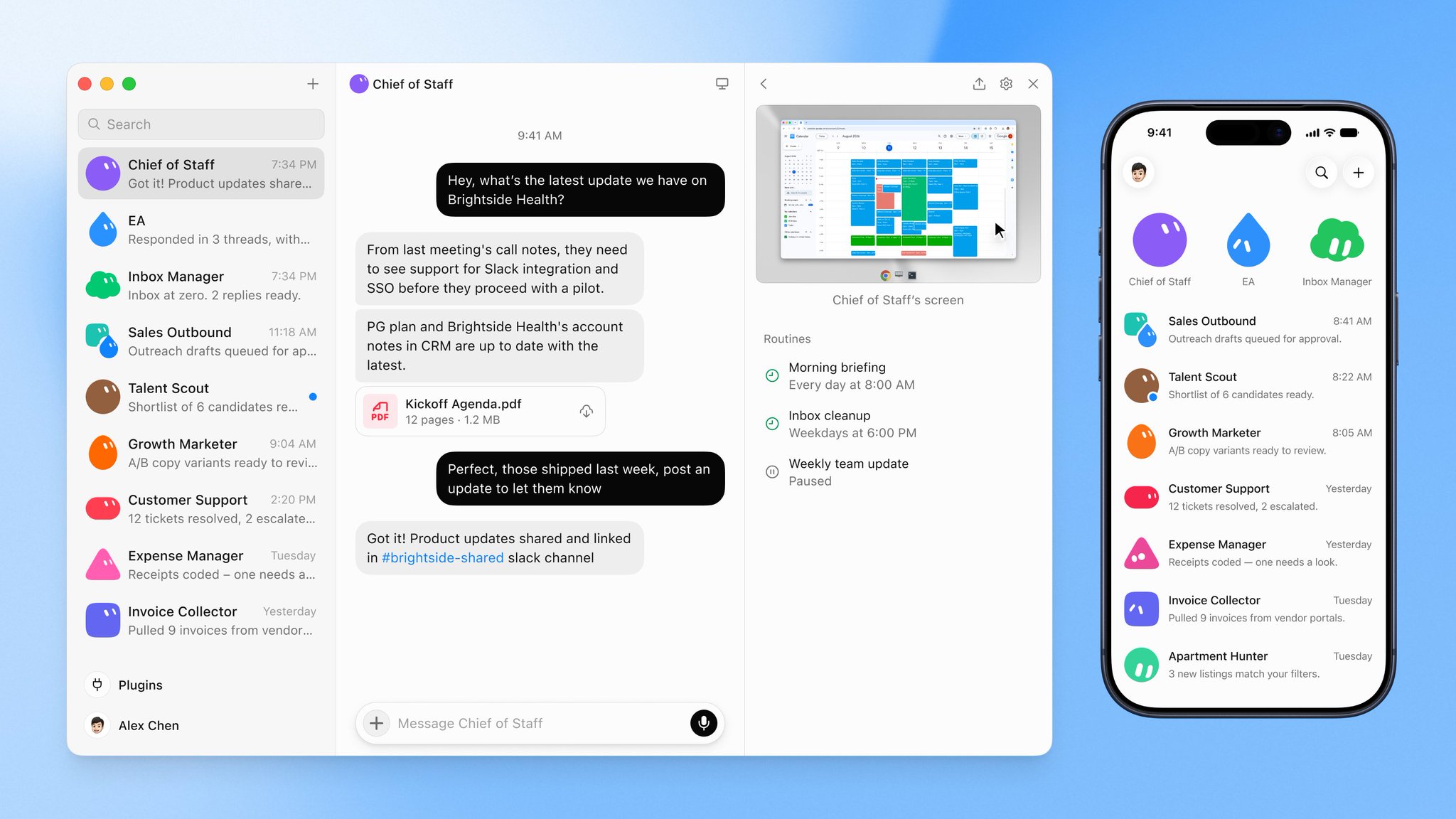
But each of those names isn't just a chat thread – it's a teammate with an actual job, its own ongoing conversation, and memory that carries over from task to task instead of resetting every time. On top of that, every one of them gets its own computer: a browser, a file system, a terminal – all running in a data center rather than on your desktop. That's the part that changes everything. Close your laptop in the middle of a task, and the work simply keeps going, because none of it was ever tied to your machine in the first place.
One account, one shared computer, and every "employee" on it works from its own screen. Several can be active at the same time, and because the files, browser sessions, and logins all live on that same shared machine, whatever one agent finishes and saves is immediately available for the next one to pick up – no exporting, no handing things off manually.
That's really the shift Grok Bot represents: agents stop being something you babysit line by line in a terminal, and start behaving like a small remote team that happens to run in the cloud instead of showing up to an office.
Then there is what the week cost. Three plans give you access:
-
Super Grok Heavy: $300 a month, bought from xAI
-
Cursor Ultra: $200 a month, and the same login opens Grok Bot
-
Cursor Teams Premium: $120 a month per seat, assigned by an admin
Each includes weekly usage, and work past that pool bills from model and token cost.
I've spent the last couple of weeks knee-deep in this kind of tooling, and I want to share what I've learned – specifically around Grok Bot and how it stacks up against the other agent frameworks people keep talking about: Buzz, OpenClaw, and Hermes.
Let me be upfront: I'm not the type of person who calls every new release "insane" or "game-changing" just because it's new. I try to stay skeptical. But after actually building with these tools side by side, I have to admit – the barrier to spinning up a working team of agents has basically collapsed. What used to take real setup work now takes minutes.
Why I started building agent teams?
I decided it was time to get serious about a real system for X – not sporadic posting, but something consistent and structured. So instead of doing everything manually, I built a small team of agents around that one goal. One agent researches topics and trends. Another one handles creative – I fed it a handful of reference infographics in a style I like, so it generates visuals that match that aesthetic. A third one drafts the actual posts. Each of them runs its own independent routine.
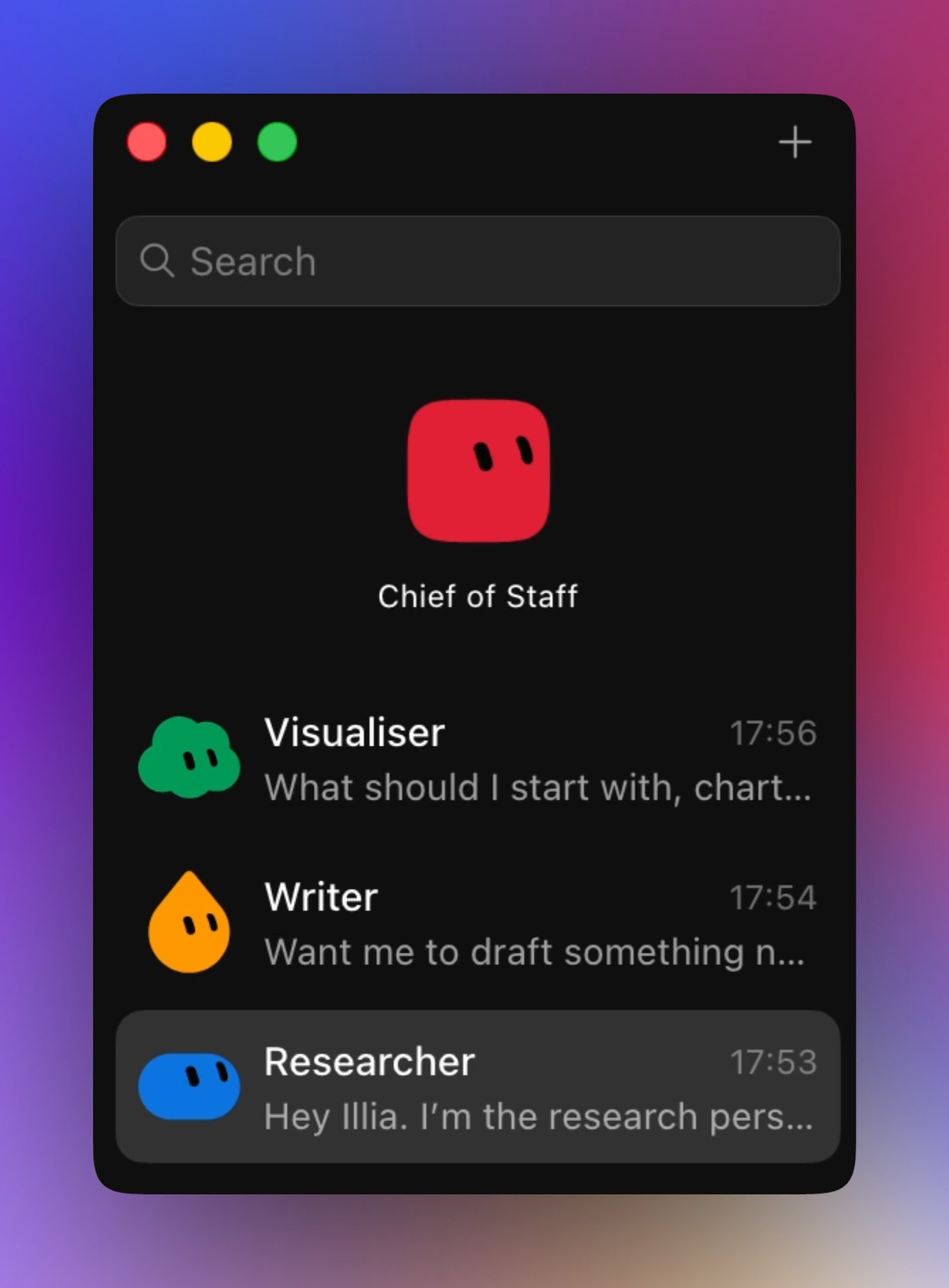
One thing I noticed early on, and it's a small but real annoyance: when you group multiple agents into a shared team chat, they lose the ability to save routines together. A routine, by the way, is really just a cron job with a friendlier name. You have to go back into each agent's individual session and set up scheduling there instead of doing it once at the team level. It's a minor UX gap, and I'd expect it to get fixed, but right now it's worth knowing about if you're planning to run a whole team rather than a single bot.
Breaking down the four approaches
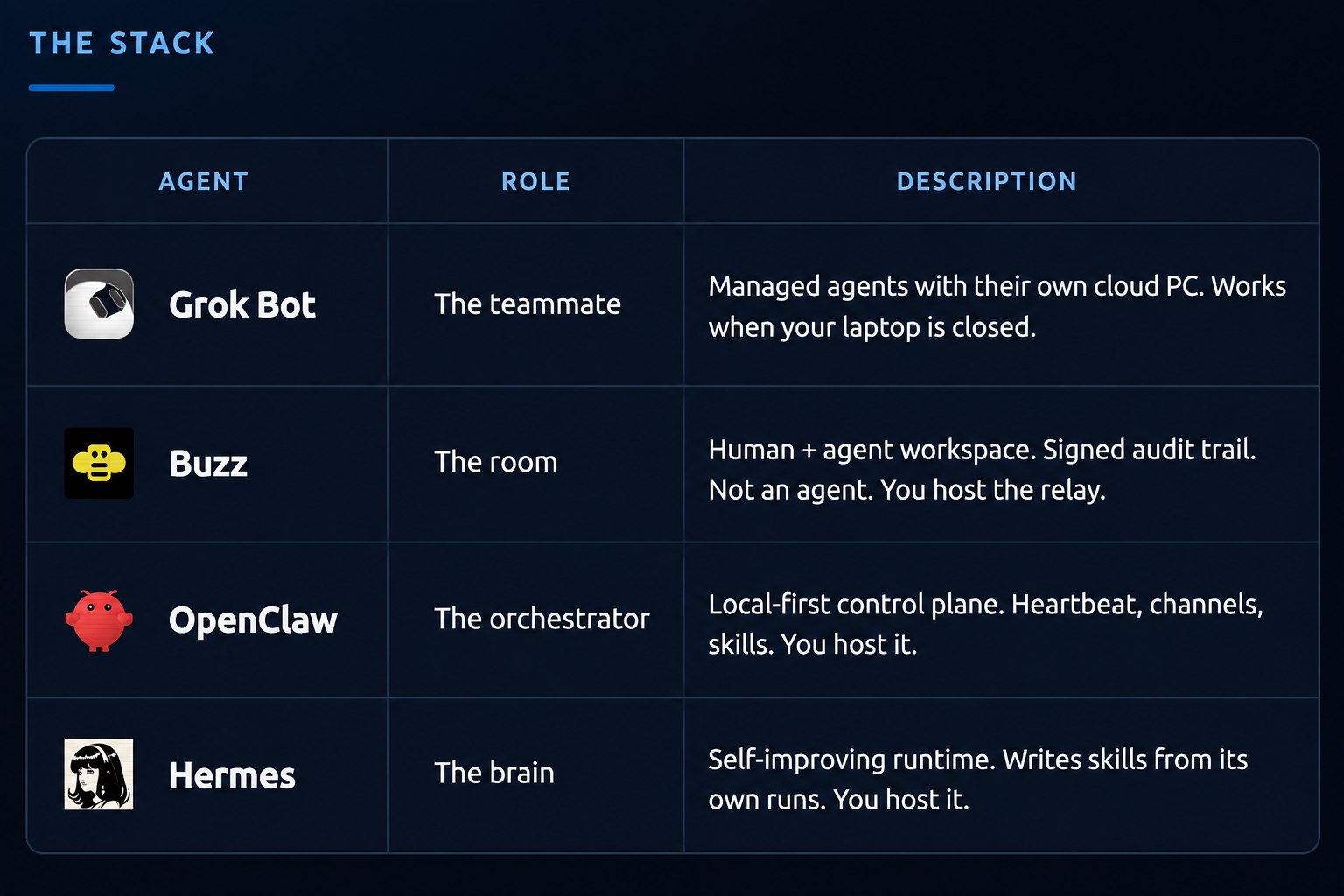
Once you start comparing Grok Bot, Buzz, OpenClaw, and Hermes side by side, a pretty clear picture emerges of what each one actually is and who it's for.
-
Grok Bot positions itself as a teammate, not just a tool. The defining feature, as above, is that each agent runs on its own cloud computer. That means it keeps working even when your laptop is closed – nothing depends on your local machine staying on. It logs into a real UI, agents can talk to each other, and your job basically shrinks down to babysitting an approval queue instead of babysitting infrastructure.
-
Buzz is closer to a shared room – a human-plus-agent workspace with a built-in audit trail. Importantly, Buzz itself is not an agent; it's the environment you drop agents into. You either self-host it or connect to a public relay, and from there you can spin up as many agents as you want inside that shared space. I'll admit, a week ago I thought Buzz was already about as fast as agent creation could get. Then Grok Bot showed up and made it feel even easier – which says a lot about how quickly this space is moving.
-
OpenClaw is the veteran here – a local-first orchestrator and control plane with its own heartbeat channel and skill system. You either host it yourself or use one-click VPS hosting options, but either way, the infrastructure responsibility sits with you or whoever you're paying to manage it.
-
Hermes is more of a "brain" – a self-improving runtime that pulls new skills from its own runs over time. Like OpenClaw, you're on the hook for hosting it yourself.
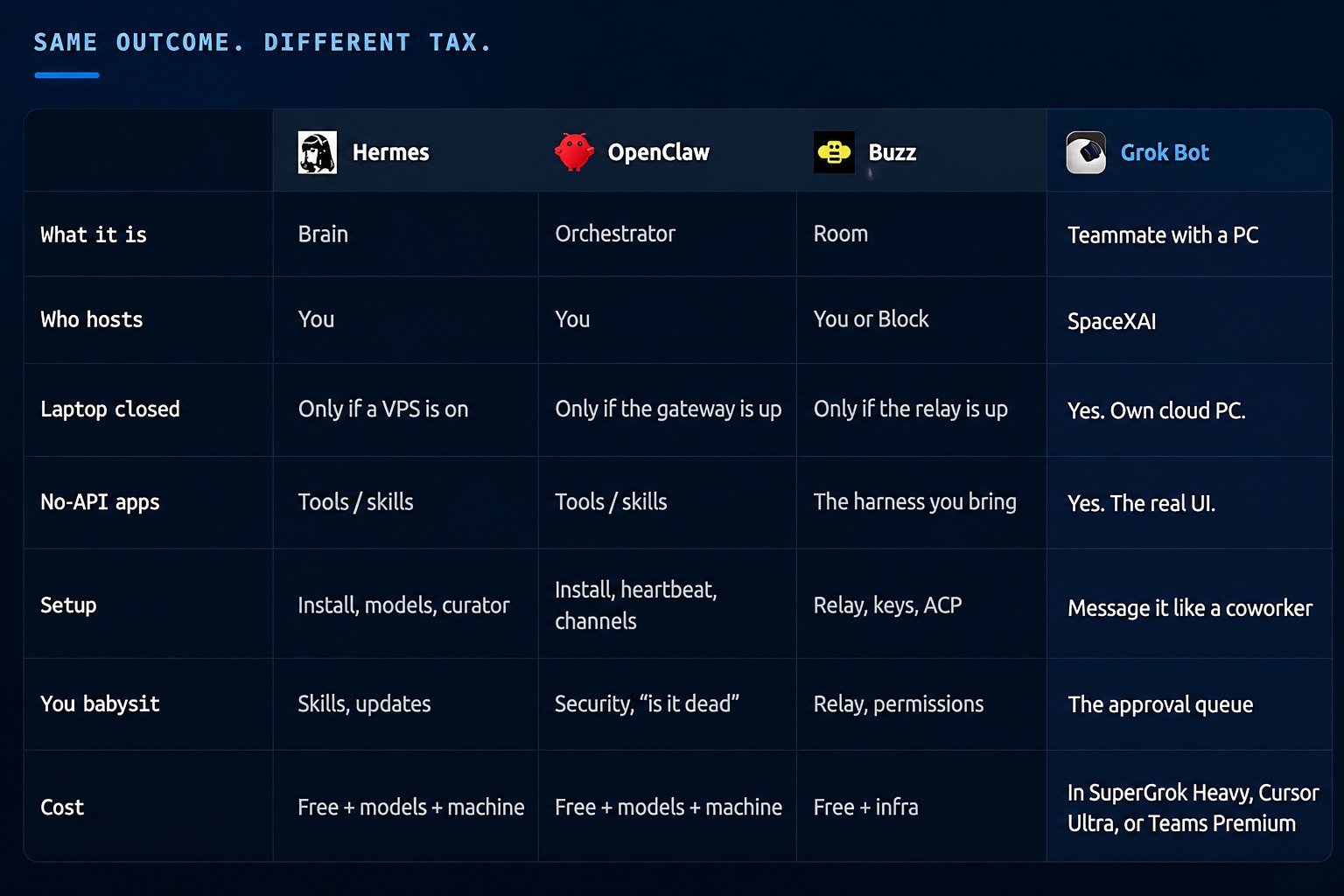
Boiling it down: OpenClaw and Hermes give you the most control, but they come with real configuration overhead – you're setting up models, writing SOPs, and maintaining infrastructure. Buzz sits in the middle: seamless once it's running, but there's an initial hurdle around saving a private key that could genuinely intimidate a non-technical user. Grok Bot, meanwhile, is the "it just works" option – assuming you're already paying for the right subscription, there's essentially no setup friction at all.
The trade-off nobody should skip over
Convenience like this always has a cost, and with Grok Bot it shows up in three places:
-
You don't get to choose the underlying model. It's Grok, full stop.
-
You don't own the harness. It's bundled into a subscription – Super Grok Heavy, Cursor Ultra, or Teams Premium (still early beta) – rather than something you control independently.
-
Your data lives on their cloud computer, not yours.
None of that is necessarily a dealbreaker, but it's a real trade you're making: convenience and speed in exchange for control. If you've been self-hosted-first the way I have, that's worth sitting with before you go all-in.
One small friction point worth mentioning: during setup, Grok Bot asked me for a credit card before I'd even signed up for Cursor Ultra. It didn't just sync automatically with my existing X account, even though I'm already paying $30/month for Super Grok Premium. I get that under the hood this is technically a Cursor product wearing a Grok label, but from a user experience standpoint, that extra step felt unnecessary. A direct sync with an existing paid X subscription would have been a much smoother onboarding.
On cost more broadly:
-
OpenClaw and Hermes are technically free, but that's a bit misleading – you either need your own hardware running a local model, or you need to pay for API usage, or you connect an existing subscription (right now OpenAI and xAI are the vocal ones about letting their subscriptions power third-party agent harnesses).
-
Buzz is open source with the same underlying logic – free in theory, but you still need compute from somewhere, whether that's your own infrastructure, a shared compute community, or a connected subscription. What's genuinely nice about Buzz is how seamlessly it connects to something like a Claude Code subscription compared to the extra hoops OpenClaw and Hermes make you jump through.
-
Grok Bot skips all of that – it's simply bundled into the subscription tier you're already paying for.
Grok Bot for building on X
This is the part I'm personally most excited about, so it deserves its own space.
Because every agent on Grok Bot gets its own persistent computer with a browser and file system, it's genuinely good at the kind of X workflow that usually falls apart the moment you try to automate – research, drafting, and creative all happening in parallel, feeding into each other, without you manually copying things between tools.
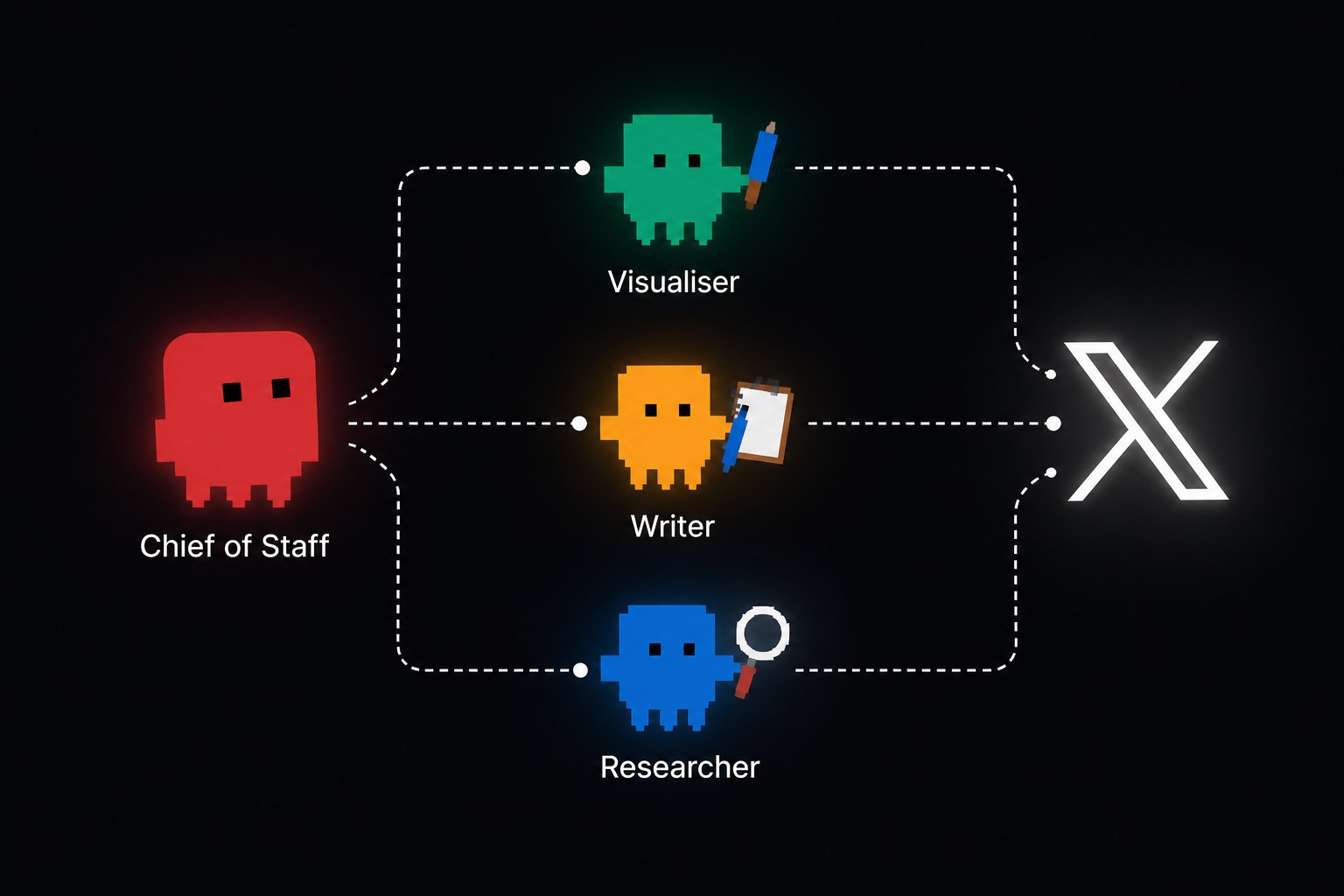
Here's roughly how I've structured mine:
-
A research agent that tracks trends, digs into relevant repositories and public discourse, and surfaces what's actually worth writing about instead of guessing at a content calendar.
-
A creative agent that I fed a handful of reference infographics in a style I like, so it now generates visuals that already match that aesthetic instead of starting from a blank canvas every time.
-
A drafting agent that turns research and creative direction into actual post copy, ready to review and stage rather than write from scratch.
Because these agents share the same underlying computer and memory setup, a finished piece of research from one is immediately available to the next – the drafting agent doesn't need me to manually paste anything over.
The advice this setup keeps converging on lines up with what most people already know but rarely commit to: post things that are true, useful, or funny – ideally all three. One idea per post. Reply more than you broadcast, instead of falling into the old "reply guy" trap. Video and images tend to outperform plain text, but the real risk isn't the algorithm – it's being boring. Don't try to game the system, because the rules change every month anyway. The one constant is having something real to say and saying it consistently, without sounding like a corporate brand account.
A few other things worth knowing if you're setting this up for X specifically:
-
You can teach an agent a repetitive task by simply recording yourself doing it once – start the recording, do the task, stop the recording – and it learns the pattern from that. Genuinely useful for the tedious, repeatable parts of a posting workflow that nobody enjoys doing by hand.
-
If you group your X-focused agents into a shared team chat, remember they won't save routines at the team level – you'll need to set scheduling on each one individually.
-
A general-purpose agent sitting on top of the team, giving you a daily rollup of what each one has been doing, is worth setting up early. It's the difference between actually knowing what your agents accomplished and just hoping they did something useful.
What people are actually building with this
What caught my attention wasn't the flashy demo features – it was watching how people are treating agent teams less like chatbots and more like tiny companies. The pattern that keeps showing up: name three or four bots, give each one a specific job, and message them the way you'd message a coworker.
People are spinning up a working "brand team" – a content bot, an assistant bot, a brand-deals bot – in five to ten minutes, sometimes based on nothing more than an existing Instagram account as reference. And the output already sounds like the person who made it.
The part I find genuinely interesting isn't any single bot – it's the handoffs between them. One agent delegating a task to another, like asking an assistant bot to get an NDA signed and having it pass that off to the brand-deals bot without a human stepping in to manage the relay. That bot-to-bot communication is where this whole category is heading, and it's the thing I'm most curious to stress-test next.
Beyond that, here's a snapshot of the range of use cases I've come across in the community:
Debbie O'Brien @debs_obrien · Aug 13 I have a new chief of staff: In @bot I simply put:
take a look at me and what i do. find all info you can on me. take a look at the bots i have created. these are your team. see if we need to change anything or add more bots. what is best way of managing these bot teams. what Show more 195 309 2.7K 4.1M
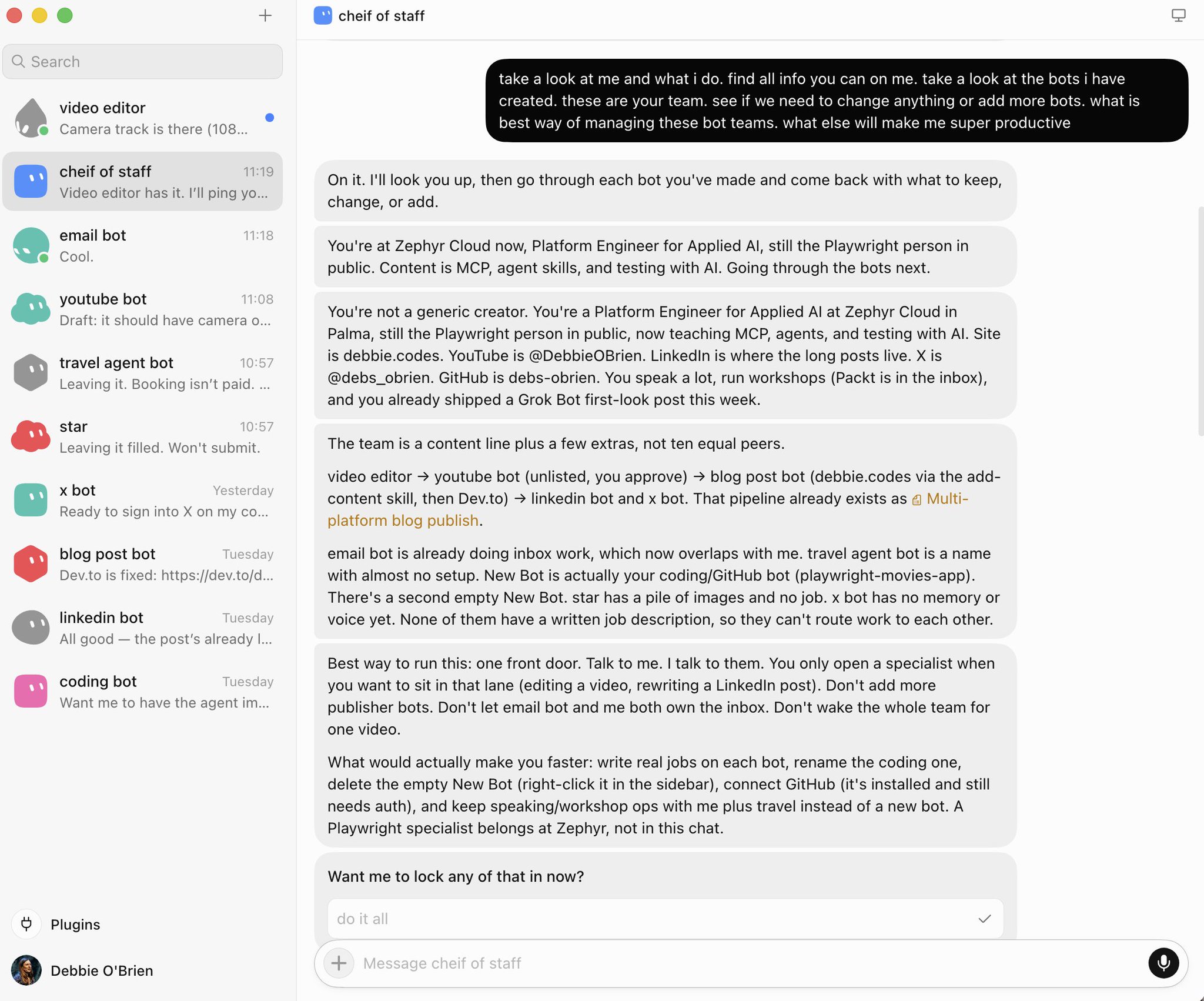
A "chief of staff" style agent that studies your existing public activity and your current bot roster, then suggests how to restructure or expand your team for maximum productivity.
Shann³ @shannholmberg · Aug 14 how you can automate your marketing with Grok Bot
one specialist bot per vertical, and every bot reads your company brain, shared notes, offers, and brand rules. the bots run in parallel and keep working 24/7.
specialist bots, and potentially what each one can own:
> SEO bot, Show more Quote eric zakariasson @ericzakariasson · Aug 11 Grok Bot is in beta!
here are 100 use cases ive seen so far:
1) book meetings by writing personalized outbound in your own gmail voice, then sending the notes for you
2) take a sales play that used to take 90 minutes to 2 hours (sql audience → copy → reverse etl) and make it x.com/bot/status/208… 16 8 259 27K
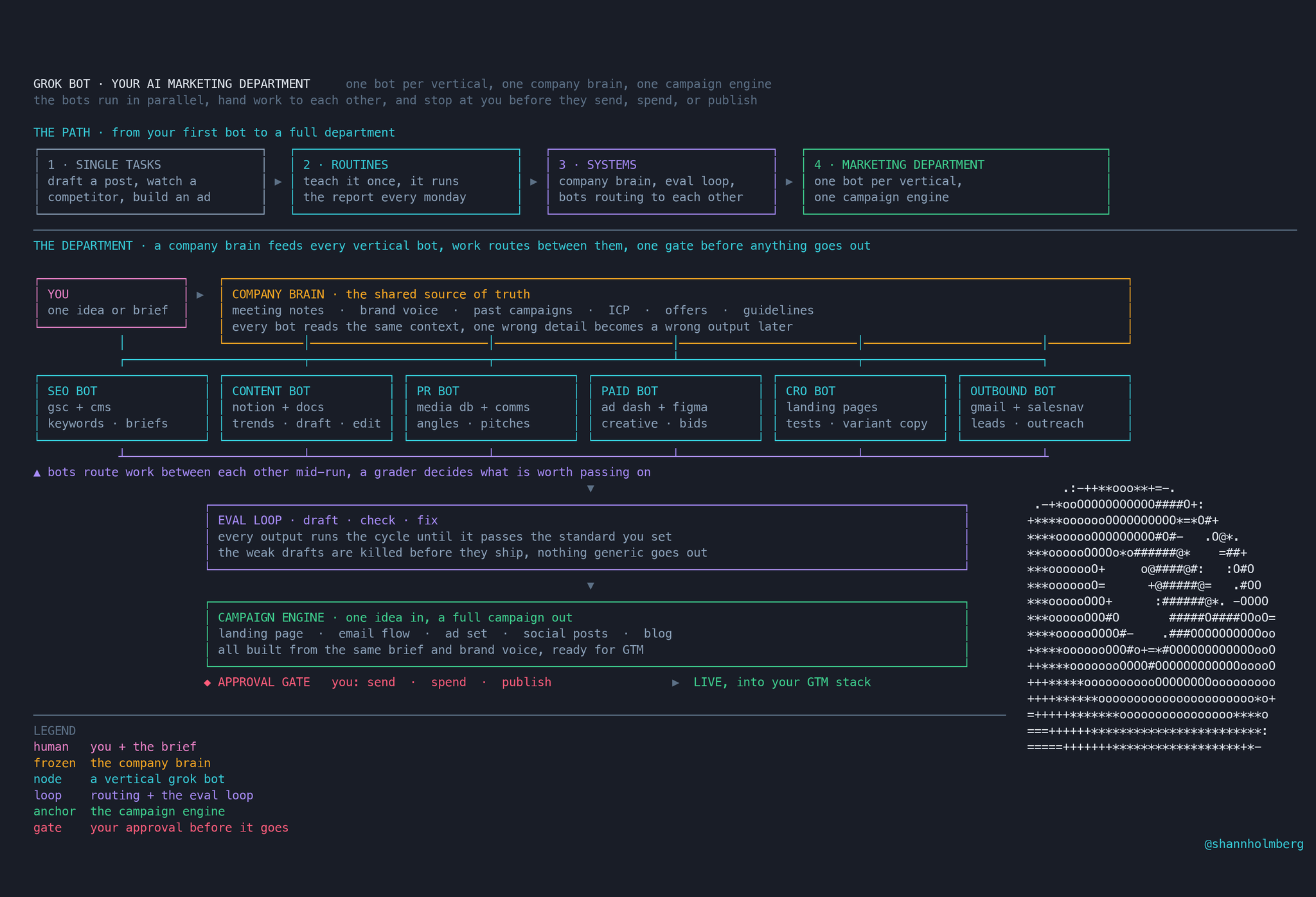
SEO and content bots that handle trend research, content briefs, internal linking, and even AEO – optimizing answers specifically for how LLMs surface information.
PR bots that track story angles, manage a media database, and monitor where your brand is getting picked up.
Paid-ads bots that generate creative angles and formats, manage bid changes, and maintain a testing backlog.
CRO bots that design experiments and write variant copy for landing pages.
Outbound bots that book prospect meetings – this one in particular feels like it's going to become one of the most common Grok Bot use cases across the board.
Ben Lang @benln · Aug 13 Collected the most-loved internal Grok Bot use cases:
• Find / book flights biased towards Starlink access • Order Whole Foods delivery from recipe photos • Fix date/GPS metadata on hundreds of film scans • Negotiate contractor quotes directly • Book prospect / customer Show more 65 81 1.2K 306K
More consumer-facing use cases too: finding and booking flights based on inflight connectivity, ordering groceries straight from a recipe photo, fixing GPS metadata across hundreds of scanned photos, negotiating contractor quotes directly, converting a sales deck into another language before a call, auto-updating decks from meeting notes, pulling deal context on mobile without logging into a CRM, and running a prospecting plan that updates a live spreadsheet as it goes.
That last batch might sound like a grab-bag, but it makes the point clearly: this isn't a niche tool for developers anymore. It's being used for genuinely mundane, high-friction daily tasks that most people just tolerate instead of automating.
Where I've landed
I'm still self-hosted-first by default, and I don't think that's changing anytime soon. But for specific, narrow use cases – especially anything content-related on X – Grok Bot has genuinely earned a place in my workflow. It's not a replacement for OpenClaw or Hermes, it's a complement. When I need to stand up a focused automation fast without thinking about infrastructure, this is what I reach for now.
If this was useful – bookmark it. You'll want to come back to it.
For more breakdowns like this follow
@ScottyBeamIO
No fluff, just what actually works.