LOOP vs GRAPH vs HARNESS ENGINEERING
The 3 AI Agent Systems Every Builder Must Understand
Agent failures
Most agent systems do not fail because the model is too weak
They fail because the system around the model was never designed as a system
The tools are unreliable
The state disappears between runs
The agent retries without learning anything
The workflow branches in ways nobody can inspect
Then every failure gets blamed on the model
That is the wrong diagnosis
There are three different engineering layers behind a serious agent:
-
the harness gives the model a place to work
-
the loop gives the work a feedback cycle
-
the graph gives the process an explicit route
They overlap
They can contain one another
But they solve different problems
A model decidesA harness lets it actA loop makes it prove the resultA graph controls what is allowed to happen next
The 30-second version
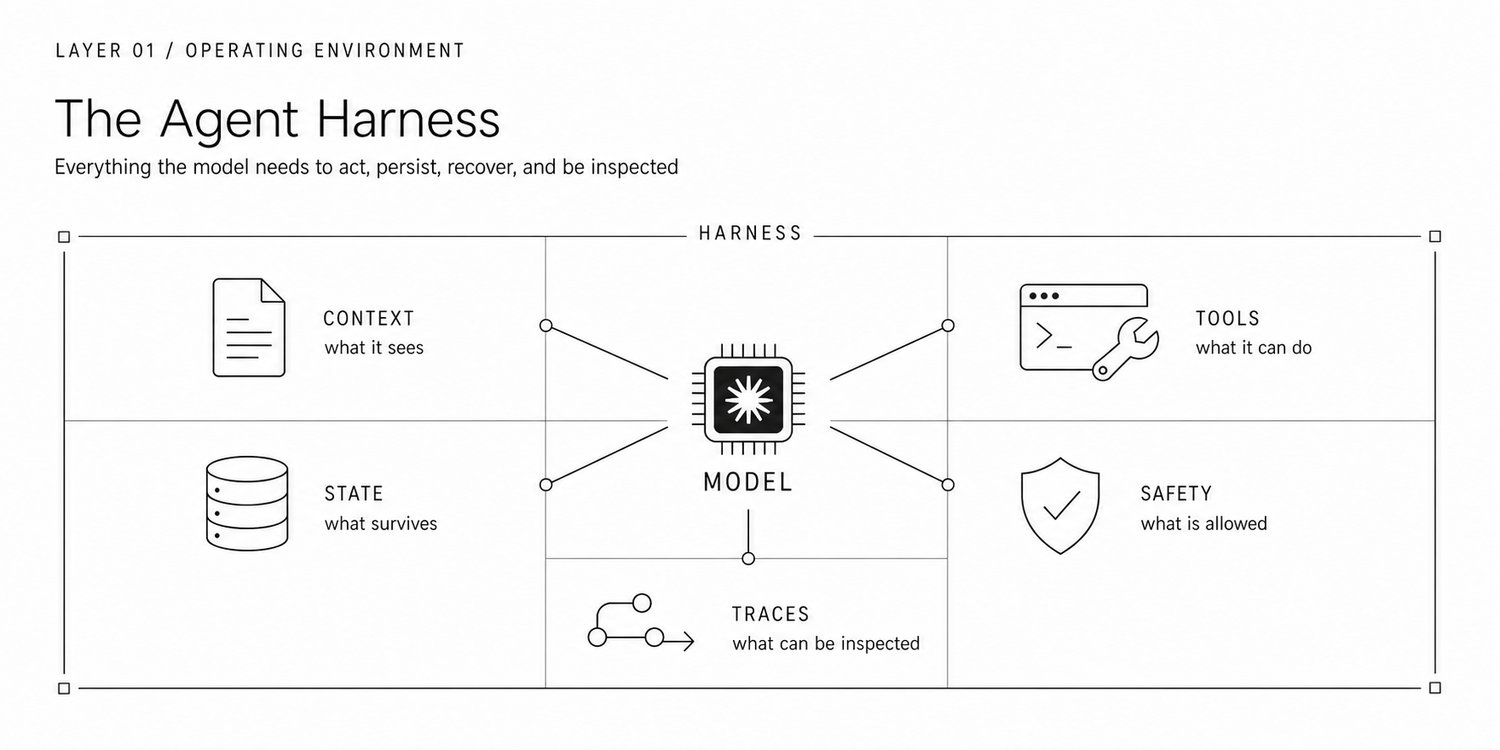
Harness engineering builds the operating environment around the model
Tools, memory, files, permissions, sandboxes, routing, checkpoints, traces and human approvals all live here
Loop engineering designs repeated work and feedback
The agent produces something, checks it against evidence, receives a useful failure signal and tries again under a bounded rule
Graph engineering makes control flow explicit
It defines the nodes, branches, joins, parallel work, legal cycles, state transitions and exit paths
The easiest way to remember the difference is:
HARNESS = ENVIRONMENT LOOP = FEEDBACK GRAPH = FLOW
This distinction matters as soon as an agent leaves a demo and starts touching real files, APIs, customers, money or production code
Why people keep mixing them together
All three layers sit around the same model
All three affect reliability
All three may include something that looks like a loop
And in a small prototype, all three are usually buried inside one script
That makes them feel interchangeable
They are not
Consider a basic tool-using agent
ask model receive tool call run tool return observation ask model again stop when finished
That small cycle is part of the runtime
But the tool definitions, filesystem and state store belong to the harness
The test-and-retry policy is a loop design decision
The choice between researcher, reviewer and publisher is a graph design decision
One piece of software can contain all three layers at once
The cleanest architecture starts by naming them separately
Layer 1: Harness Engineering
A raw model can transform input into output
It cannot independently maintain project state, run a test suite, inspect a browser, write files safely, enforce permissions or resume tomorrow where it stopped today
The harness supplies those capabilities
The simplest definition is:
The model is the intelligence The harness is the machinery that makes that intelligence useful
Remove the model from your architecture diagram
Everything still visible is probably part of the harness
This is the production shift Boris Cherny keeps pointing at through Claude Code: hooks, scheduled runs, isolated worktrees, custom agents and parallel execution are not prompt tricks
They are harness primitives
Boris Cherny @bcherny · Mar 30 I wanted to share a bunch of my favorite hidden and under-utilized features in Claude Code. I'll focus on the ones I use the most.
Here goes. 538 2.9K 23K 3.9M
What belongs inside a serious harness
Context
-
system instructions
-
retrieved knowledge
-
conversation state
-
task policies
-
skills and operating procedures
Action surfaces
-
APIs
-
browser control
-
shell and code execution
-
databases
-
MCP tools
-
specialist agents
Persistence
-
files
-
checkpoints
-
session state
-
progress logs
-
git history
-
long-term memory
Execution control
-
timeouts
-
retry limits
-
token and cost budgets
-
model routing
-
handoffs
-
approval gates
Safety
-
isolated environments
-
least-privilege permissions
-
allow lists
-
secret handling
-
human authorization
Observability
-
traces
-
tool inputs and outputs
-
state transitions
-
cost and latency
-
evaluation results
Where harness engineering earns its keep
Harness work becomes critical when tasks last longer than one context window
A coding agent that works for hours cannot rely on chat history alone
It needs durable artifacts that another session can understand
A useful setup might include:
-
an initializer that inspects the workspace
-
a progress file that explains what is done and what remains
-
git commits that preserve working states
-
checkpoints before risky actions
-
verification tools that produce clear evidence
This is not a better prompt
It is a better working environment
Start with harness engineering when the agent:
-
cannot access the right capability
-
loses progress between sessions
-
has permissions that are too broad
-
behaves differently across environments
-
cannot be paused, inspected or resumed
-
produces failures nobody can reconstruct
Layer 2: Loop Engineering
Every tool-using agent already has a small internal loop
model -> action -> observation -> model
Loop engineering begins when you intentionally design the cycles around that behavior
The goal is not to make the agent repeat itself forever
The goal is to turn a one-shot attempt into a managed process
The verification loop
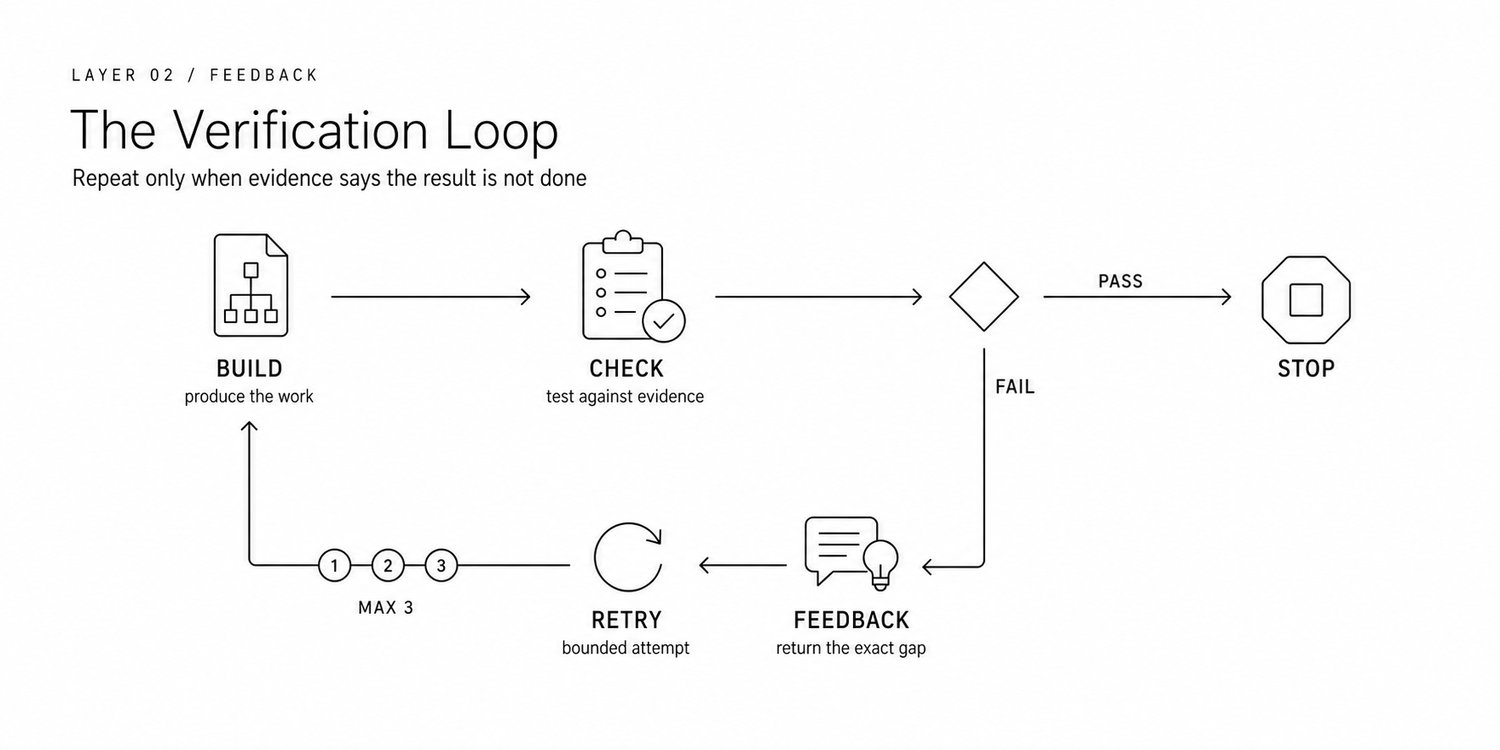
The most useful outer loop is simple
BUILD ↓ CHECK AGAINST EVIDENCE ↓ PASS? ── yes ──> STOP │ no ↓ RETURN SPECIFIC FEEDBACK ↓ RETRY WITH A LIMIT
The check may be deterministic:
-
tests pass
-
schema validates
-
links resolve
-
numbers reconcile
-
files compile
Or it may require a reviewer:
-
the argument is complete
-
the tone matches the audience
-
the evidence supports the conclusion
-
the change is scoped correctly
The rule is the same
Do not loop on confidence
Loop on evidence
"The agent says it is finished" is not proof
"The tests pass, the sources resolve and the reviewer approved the diff" is proof
The leverage comes from building the cycle once and letting the system run it for you
Claude's scheduled tasks are the visible product version of the same shift: define recurring work once and let the system re-enter it without another manual prompt
Scheduling is only the trigger
The checks, feedback and exit condition are what turn the recurring task into an engineered loop
Claude @claudeai · Feb 25 New in Cowork: scheduled tasks.
Claude can now complete recurring tasks at specific times automatically: a morning brief, weekly spreadsheet updates, Friday team presentations. The media could not be played. Reload 966 3.3K 21K 8.2M
The anatomy of a useful loop
Every production loop needs seven things
- Trigger
What starts another cycle: a request, schedule, webhook, failed test, new document or evaluator result
- Goal
A measurable state to reach, not "keep improving"
- State
What the next attempt must know without replaying the entire history
- Action policy
What the agent may change, call, delegate or spend
- Evidence
Tests, citations, diffs, metrics, schemas or human review
- Feedback
A compact explanation of what failed and what must change
- Stopping rule
Success, maximum attempts, budget exhaustion, timeout, hard error or human escalation
Loops can stack
The agent loop performs the work
The verification loop checks the work
An event loop wakes the system when new work arrives
An improvement loop studies production traces and changes the harness itself
EVENT LOOP └── VERIFICATION LOOP └── AGENT LOOP
TRACE IMPROVEMENT LOOP └── updates prompts, tools, policies and graders
This is why loop engineering is larger than prompt engineering
A prompt defines what should happen during one model call
A loop defines what the system does after that call
The cost is obvious
Every retry, grader and reviewer adds latency and spend
Add a loop when the expected cost of failure is higher than the cost of verification
Layer 3: Graph Engineering
Graph engineering asks a different question
Not "how should the agent work"
But "what is allowed to run next"
Work becomes nodes
Allowed transitions become edges
State moves through the graph
That structure can represent:
-
fixed sequences
-
conditional branches
-
parallel fan-out
-
joins
-
bounded cycles
-
recovery paths
-
human interrupts
What graph engineers actually decide
Node boundaries
Which work belongs in normal code, an LLM call, a specialist agent or a human review step
State schema
What each node may read or update and how parallel results are merged
Routing conditions
Which evidence moves work forward, backward, sideways or into escalation
Concurrency
What can run in parallel and what must wait for a join
Cycles and exits
Where retries are legal, how many attempts are allowed and what makes the cycle safe
Durability
Where execution is checkpointed and how it resumes after interruption
When a graph is worth the ceremony
Use a graph when the process contains meaningful branches, parallel specialists, approvals, recovery routes or stateful handoffs
Do not start with a graph only because the workflow has multiple steps
If one capable agent with three tools can solve the task, a graph may add structure without adding value
There is another failure mode
Teams formalize the workflow before they understand the work
The result is a beautiful diagram that encodes the wrong assumptions
Start with a simple harness
Study real traces
Formalize the paths that remain stable
The next step after loops is making the execution topology explicit
OpenAI packaged the same idea into Agent Builder: a visible workflow canvas for multi-agent execution with guardrails and evals around the graph
OpenAI Developers @OpenAIDevs · Oct 6, 2025 Introducing AgentKit—build, deploy, and optimize agentic workflows.
💬 ChatKit: Embeddable, customizable chat UI 👷 Agent Builder: WYSIWYG workflow creator 🛤️ Guardrails: Safety screening for inputs/outputs ⚖️ Evals: Datasets, trace grading, auto-prompt optimization The media could not be played. Reload 290 2K 11K 2.9M
How all three layers work in one real system
Imagine a research-and-publishing agent that produces a factual industry briefing
The harness provides:
-
browser and search tools
-
source storage
-
a writing workspace
-
citation checking
-
permissions and approval rules
-
checkpoints and traces
The graph controls the route:
RESEARCH ↓ DRAFT ↓ FACT CHECK ── fail ──> RESEARCH │ pass ↓ EDITORIAL REVIEW ── fail ──> DRAFT │ pass ↓ HUMAN APPROVAL ↓ PUBLISH
The loops live inside that route
The research node may search until source coverage is sufficient
The drafting node may revise until the style grader passes
The fact-check node may return exact unsupported claims instead of a vague rejection
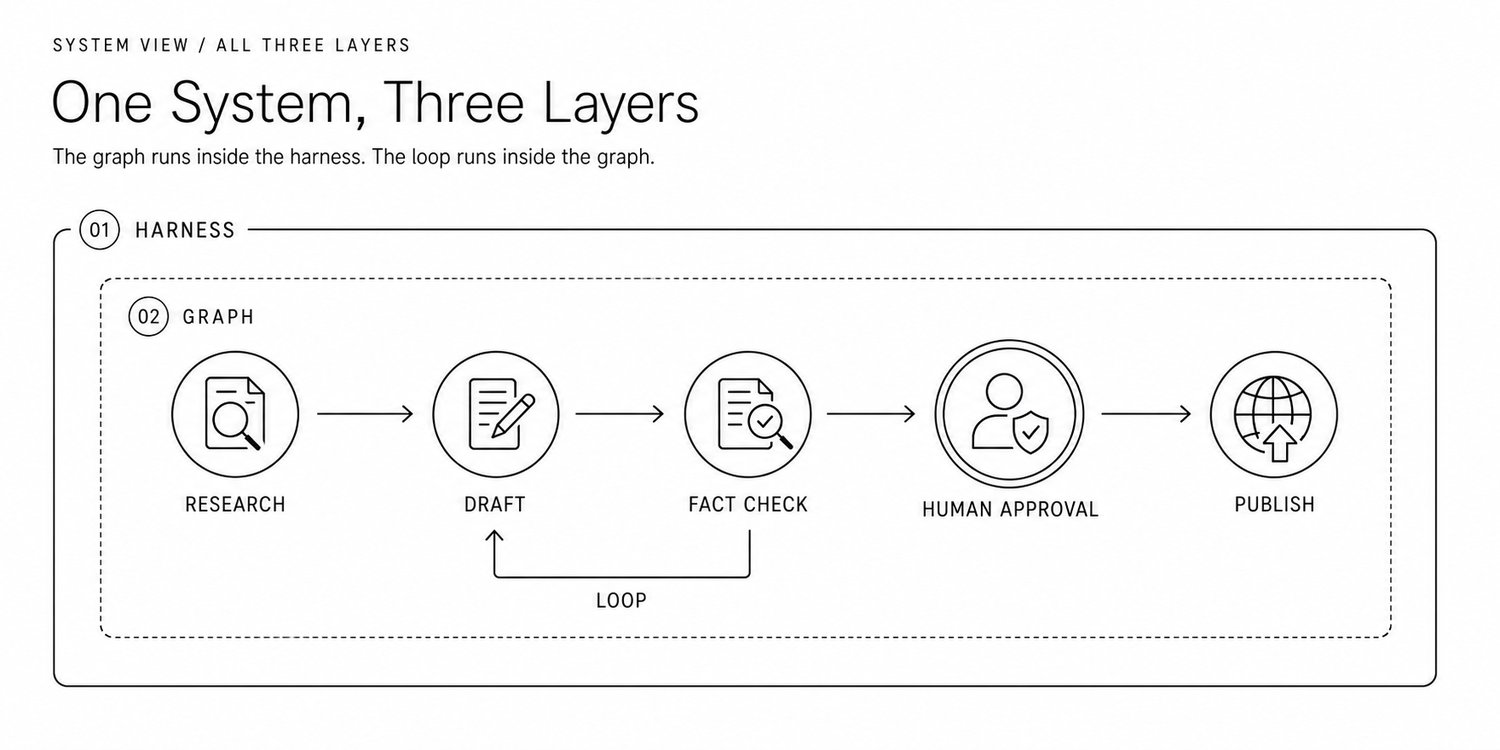
The nesting is the important part
The graph runs inside the harness
The loops run inside parts of the graph
The harness supplies the tools, state and evidence those loops need
The layers overlap because real software layers overlap
They still give you three different levers when the system fails
Diagnose the failure before changing the architecture
Symptom
Start with
Likely fix
The agent cannot access the right data safely
Harness
Better tool contract, permissions, sandbox and context injection
The agent forgets progress between sessions
Harness
Durable state, checkpoints, progress artifacts and compaction
The first attempt is close but unreliable
Loop
External grader, deterministic tests, actionable feedback and bounded retry
The agent continues after success or stops before proof
Loop
Evidence-based terminal states and budget-aware stop rules
Specialists must run in a controlled order
Graph
Explicit nodes, edges, routing conditions and joins
A multi-step failure is impossible to locate
Graph + harness
Stateful traces aligned with nodes and transitions
The process changes too quickly for a fixed diagram
Simpler harness
Keep planning model-driven and delay graph formalization
This table is more useful than arguing about terminology
Find the layer that owns the failure
Fix that layer first
The expensive mistakes behind weak agent systems
Building the graph too early
Do not convert an imagined business process into forty nodes before watching a strong agent perform the work
Trace first
Formalize second
Letting the maker grade itself
Self-review is useful but shares the same blind spots as the original attempt
Prefer deterministic checks where possible
Use an isolated reviewer context for subjective checks
Require human approval for high-impact actions
Defining the loop as "keep trying"
An unbounded retry is not reliability
It is a cost leak
Every cycle needs fresh evidence, a maximum attempt count and a named escalation path
Turning the harness into a warehouse
More tools do not automatically create a better agent
A crowded toolset increases selection errors
Noisy context increases confusion
Broad permissions increase risk
Give the agent the smallest environment that can complete the job
Blaming the model for orchestration failures
A stronger model cannot reliably repair stale state, broken APIs, ambiguous tool schemas or missing exit conditions
Do not upgrade the model before proving the model is the problem
A production-ready checklist
Harness
-
are the tools narrow, documented and observable
-
is state durable across sessions
-
are permissions least-privilege
-
can an operator pause, inspect and resume the run
-
can every important action be reconstructed from traces
Loop
-
what evidence proves success
-
what feedback is returned after failure
-
how many retries are allowed
-
what happens when the budget is exhausted
-
where human judgment is required
Graph
-
which paths must be deterministic
-
where can work run in parallel
-
what state is shared
-
where are the joins, approvals and recovery routes
-
which cycles are legal and how do they terminate
Evaluation
-
can the team replay real traces
-
can versions be compared against the same tasks
-
can an improvement be attributed to a specific change
Operations
-
are cost and latency monitored
-
is failure rate visible by node and tool
-
is human intervention measured
-
is task-level success measured in production
The simplest way to remember the difference
Harness engineering makes the model operational
Loop engineering makes the work iterative and verifiable
Graph engineering makes complex execution explicit and controllable
None replaces the others
A perfect graph cannot save an agent that loses its state
A perfect harness still wastes money if the loop has no evidence or stop rule
A strong loop becomes difficult to operate when branches, parallelism and approvals are hidden inside ad hoc code
Reliable agents appear when all three layers are designed together
And when every layer has one clear job
ENVIRONMENT -> HARNESS FEEDBACK -> LOOP FLOW -> GRAPH
That is the whole framework
Sources and further reading
-
Claude scheduled tasks
-
OpenAI AgentKit
-
OpenAI Agents SDK
-
AutoGen GraphFlow
-
Building Effective AI Agents
If you read this far
Bookmark the article and follow @0xwhrrari for more practical agent engineering
Also you can read other articles:
-
How I set up Obsidian + Claude as my second brain
-
How I set up Claude to actually get work done
-
How I set up Claude projects so they actually work
-
30 Claude system prompts I actually use
-
Loop Engineering: The AI skill every builder needs in 2026
-
30 Claude Code settings, shortcuts & workflows most users miss
-
How I Use Claude Cowork to Run Like a One-Person Company