How to Build a Grounded Document Agent
You upload a dense 40-page report and ask a simple question.
“What changed quarter over quarter?”
A few seconds later, the agent gives you a percentage and a confident explanation. The answer sounds plausible and it might even be correct, but unless you can see where that number came from, you are still taking the model’s word for it.
Was it pulled from the financial table on page 18? Did it come from a chart? Did retrieval bring back the wrong section? Or did the model simply generate something that looked reasonable?
That is the problem I wanted to solve with this project.
I built a Grounded Document Agent that answers questions about long PDFs, attaches numbered citations to the response, and lets you inspect the source text and page behind every citation.
PDFs are where capable agents become unreliable
A PDF looks structured to us. It has headings, columns, tables, footnotes, charts, captions, and a clear reading order.
A basic text extraction pipeline does not necessarily preserve any of that.
A two-column research paper can get read across both columns. A financial table can turn into a sequence of disconnected numbers. A chart may be reduced to a caption, and scanned pages may contain no machine-readable text at all.
The damage happens before the model sees the document.
That means a lot of failures that look like retrieval problems are actually parsing problems upstream. If a table was flattened incorrectly, better embeddings cannot reconstruct which value belonged to which column. If the reading order is wrong, increasing the context window simply gives the model more incorrectly ordered text.
The quality of the answer is bounded by the quality of the parse.
For this project, I used LlamaParse by LlamaIndex to parse uploaded PDFs into layout-aware Markdown while keeping the page metadata we need later for grounding.
LlamaIndex also publishes ParseBench, an open benchmark for document parsing across tables, charts, content faithfulness, semantic formatting, and visual grounding. Those are the kinds of things that matter much more in a document agent than simply knowing whether OCR recognized individual words.
The agent parses once and answers locally
The project has a fairly simple architecture.
LlamaParse handles the document parsing in the cloud. Once that is done, embeddings, indexing, retrieval, the document overview, questions, and generated answers run locally through LlamaIndex and Ollama.
When a user uploads a PDF, LlamaParse converts it into page-aware Markdown. The parsed documents are then embedded using Ollama’s nomic-embed-text model and stored in a LlamaIndex VectorStoreIndex.
That index is persisted locally, so it does not need to be rebuilt every time the app starts.
When the user asks a question, the system retrieves the four most relevant sections by default and sends that evidence to qwen3:4b-instruct, also running locally through Ollama.
LlamaIndex’s CitationQueryEngine sits on top of that retrieval flow. It breaks the retrieved context into smaller citation chunks, assigns each one a source number, and asks the model to cite the evidence it uses inline as [1], [2], and so on.
The parse is cached too. The app hashes the uploaded file, so if you open the same document again, it loads the existing parse instead of sending the PDF through LlamaParse and spending credits on the same document twice.
The LlamaParse integration itself is small:
python parser = LlamaParse( api_key=require_api_key(), result_type="markdown", verbose=True, ) parsed = parser.load_data(str(path))
The useful part is not only the Markdown. Each resulting document also keeps its page metadata, and that metadata stays attached as the content moves through indexing and retrieval.
Without it, the application could still show the retrieved text, but it would have no reliable way to tell you where that text came from in the original PDF.
Turning the parsed document into something searchable
Once the PDF has been parsed, we still need a way to find the right parts of it for every question.
Sending a 40-page or 100-page document to the model for every query does not make much sense when the answer might live in one table or a few paragraphs.
Instead, the parsed content is converted into embeddings and stored in the VectorStoreIndex.
When a question comes in, that question is embedded too, and the index searches for the document sections that are semantically closest to it.
If you ask:
What changed quarter over quarter?
the model does not receive the entire report. It receives the handful of sections retrieval thinks are most useful for answering that question.
The query layer itself is compact:
python return CitationQueryEngine.from_args( index, similarity_top_k=SETTINGS.similarity_top_k, citation_chunk_size=SETTINGS.citation_chunk_size, )
similarity_top_k controls how many relevant sections are retrieved.
citation_chunk_size controls how finely the retrieved evidence is divided before it becomes a numbered citation source.
In this project, the retrieved context is split into 512-character citation chunks. Smaller chunks make an individual source easier to inspect, but they can also fragment context the model needs for reasoning. Larger chunks preserve more surrounding information, but the citation becomes less precise.
There is no universal setting here. It depends on the kind of documents you expect to work with and the model you are running.
Only the parsing step uses the cloud
The PDF itself is sent to LlamaParse for parsing. After that, the repeated Q&A workflow stays local.
Ollama handles the embeddings and answer generation, the vector index is stored on the machine, and retrieval runs against that local index.
This split makes sense for document agents because parsing is the part where specialised document understanding matters most. Tables, charts, scans, reading order, and complex layouts are difficult to handle with a normal text extraction pipeline.
Once you have a useful representation of the document, the rest of the workflow does not necessarily need to keep sending the PDF or the user’s questions to an external model.
It also makes development cheaper. Parse the document once, cache it, and you can keep iterating on retrieval, prompts, citation settings, and local models without paying to process the same PDF again.
A citation is only as good as the evidence behind it
Suppose the answer to a question lives in a financial table.
A weak parser might extract all the right numbers but associate one of them with the wrong column header. Retrieval can still find that page because the relevant words are there, and the model can still generate a convincing answer from what it received.
The system can even attach the correct page citation.
But the answer is still wrong because the underlying evidence was parsed incorrectly.
Adding a citation does not fix that. It only tells you where the evidence came from.
That is why this project exposes the actual source content behind each answer. The interface shows the page number, retrieved text, highlighted query terms, and relevance score so you can inspect what the model received before deciding whether the answer makes sense.
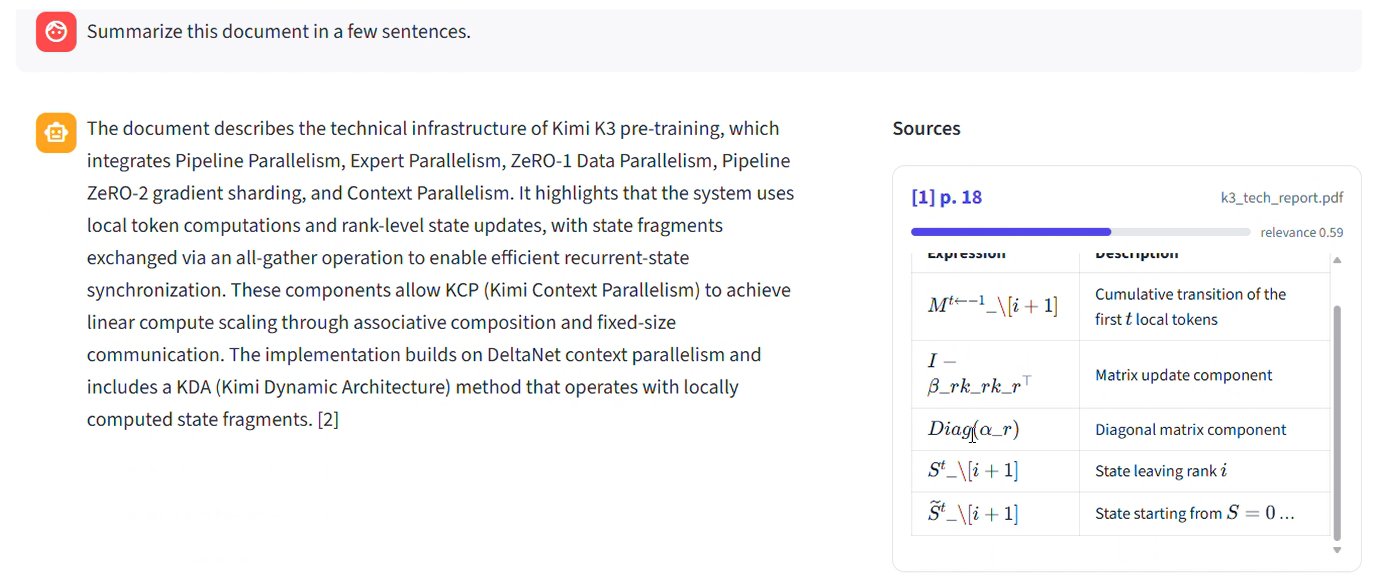
The model can still misunderstand good evidence, and retrieval can still return the wrong section. The difference is that the failure is visible.
If the answer looks wrong, you can inspect the citation and see whether the problem came from parsing, retrieval, or generation instead of treating a confident response as the final truth.
Try the complete project
The same setup works for annual reports, research papers, contracts, technical manuals, and other long documents where being able to verify the source matters as much as getting the answer.
There are a few obvious ways to take it further. Citations could open directly on the corresponding PDF page, the app could refuse to answer when retrieved evidence is too weak, or you could swap the small local model for something larger depending on the hardware available.
The complete project is open source. You can connect your LlamaCloud API key, start Ollama locally, upload your own PDF, and run the same citation workflow:
Project: https://github.com/Sumanth077/Hands-On-AI-Engineering/tree/main/ai_agents/grounded_document_agent
LlamaIndex is also running an End of Summer offer through September 30. New accounts get $250 in LlamaParse credits at signup with no purchase required, and Pro is 50% off for the first three months if you upgrade within 30 days of signing up, or earlier if those credits run out.
I’ve shared the signup link and coupon in the replies.
Thanks to LlamaIndex for working with me on this one.