How to build motion design studio with Opus 5.5 ( Full-course )
Most people who try motion design with Opus 5.5 end up with the same video: centered text on a gradient, everything fading in, a logo at the end.
They don't give it a reference, don't give it a render engine, don't ask it to look at its own frames.
This is the 12-step course that turns that mess into a repeatable studio pipeline. The prompt is 10% of the video. The other 90% is the harness.
Follow my Substack to get fresh AI alpha: movez.substack.com
Claude @claudeai · Sep 22 Introducing Claude Opus 5.5, the first model in our new Claude 5.5 family.
It performs at the level of Claude Fable 5.1 for most tasks, and costs 40% less to run than Opus 5. 3.3K 15K 96K 27M
On September 22, 2026 Anthropic shipped Claude Opus 5.5.
Within hours the timeline filled with showreels, launch videos, music videos and five-minute history films, all of them rendered from code.
Captions said "one prompt". Replies said "motion designers are cooked".
Both are half true. Some clips really came from a 30-word prompt.
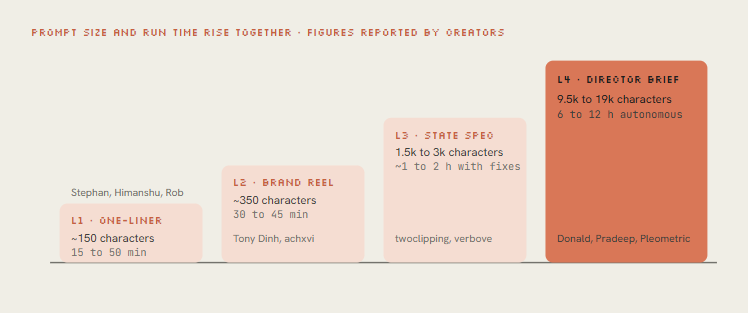
Others came from a 9,500-character director's brief, a folder of skills, two API keys and a 12-hour autonomous run.
Thariq from the Claude Code team summed up the gap in one line: the post says one-shot, the prompt is 10k characters with skills, examples, keys.
Thariq @trq212 · Sep 23 the post: "Claude one-shot this"
the prompt: 10k characters with good takes plus skills, examples and API keys Quote donald @donaldjewkes · Sep 23 Replying to @donaldjewkes I've included an MP4 file and an original link to a video that is called "Claude Pop." It's a pop song that is about increasing rate of progress and the experience of the singularity approaching.
I want you to independently do an end-to-end complete pass on making an updated x.com/other__reality… 75 55 2.2K 259K
This course shows you both ends and everything in between.
You'll read every one of the 9 posts that defined the trend, copy the prompt pattern each one used, and then build the engine yourself.
A seek(t) renderer, closed-form springs, a beat grid, synthesized sound, and a critique loop that makes Opus fix its own frames.
- Part 1 · What is actually happening
01. Pixels - model writes a program, not a video
Opus 5.5 takes text and images in and puts text out. It cannot emit an MP4. Every video in this trend is a program that Opus wrote, and something else turned that program into frames.
The core trick is determinism. Opus writes a single function, draw(t) or seek(t), that paints the exact frame for any moment in time.
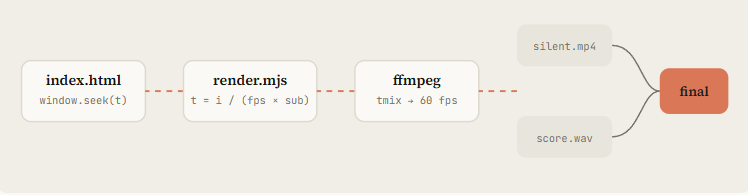
A headless browser calls it 900 times for 15 seconds at 60 fps, screenshots each frame, and ffmpeg stitches them.
Nothing depends on a timer, so the render is identical every run and a change is a one-line edit plus a re-render.
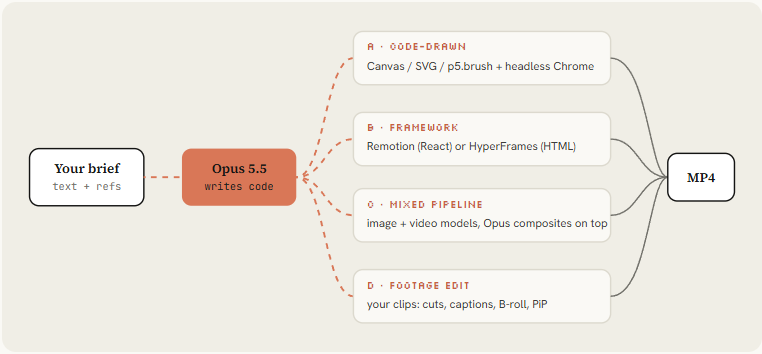
Tommy Rossi dug into the one-shot output and found Opus prefers route A with zero dependencies: one index.html, a seek function called through eval, Playwright capturing frame by frame, ffmpeg encoding.
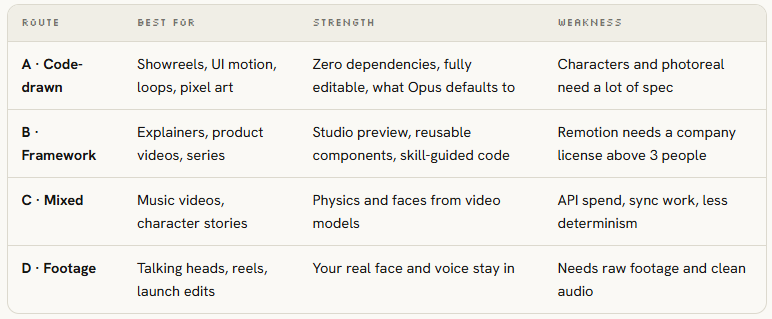
It skipped Remotion and HyperFrames even when available. If you want a framework, say so explicitly.
Tommy D. Rossi @__morse · Sep 25 tried using the same prompt and asked to make the video more colorful. opus 5.5 is really amazing
one shot, it put all the code in a single index.html file and rendered it using playwright frame by frame in a headless window, then ffmpeg to generate the mp4. it used a seek Show more Quote zero @twoclipping · Sep 24 0:14 opus 5.5 is f*cking cracked at motion design
this entire video is code, 0 after effects
im open sourcing the prompt template for these motion designs
steal it to recreate these ↓
<inputs> Ask me for: 8 to 12 UI states I want the shape to become (e.g. button, loader, player, 6 9 195 23K
02. Setup - install the studio in 10 minutes
The chat app can write an animation, but only Claude Code (or any agent with a shell) can render it, listen to it and look at its own frames.
That feedback loop is the whole difference between the "mid" first try people complain about and the viral ones.
python
1. Runtime: Node 22+, ffmpeg, Python for audio analysis
brew install node ffmpeg python # macOS; apt install on Linux pip install numpy librosa soundfile
2. A clean project and a headless browser
mkdir motion-studio && cd motion-studio && npm init -y npm i -D playwright && npx playwright install chromium
3. Framework skills (optional, route B)
npx skills add remotion-dev/skills # /remotion-create, /remotion-render ... npx skills add heygen-com/hyperframes # /hyperframes router + GSAP skills
4. Hand-drawn look (optional): Node canvas rigs, pens, synthesized sound
claude plugin marketplace add buildwithhanif/claude-animation-skill claude plugin install claude-animation@claude-animation-skill
5. Start Claude Code on Opus 5.5 at high effort
claude --model claude-opus-5-5 > /model # pick Opus 5.5, then set effort to xhigh for one-shots, max for flagship pieces
Then drop a house-rules file in the project root. Claude Code reads CLAUDE.md on every run, so these rules apply to every video you make here without repeating them.
python
Motion studio rules
Render contract
- Every film is a pure function of time:
window.seek(t)paints frame t. - No CSS transitions, no setTimeout, no requestAnimationFrame in render mode, no state carried between frames. Seeded noise only (mulberry32), never Math.random.
- Render with
node render.mjs, encode H.264 yuv420p, CRF 16.
Look
- Banned defaults: centered title on gradient, everything fading in, corner labels and frame borders, glow on UI chrome, generic particle bursts.
- One display face, one UI face. One accent color unless the brief says otherwise.
- Every 2 to 4 seconds something new must happen on screen.
Sound
- Score and SFX are synthesized in code unless a track is supplied.
- Place hits on the measured beat grid (beats.json). Loudness -14 LUFS.
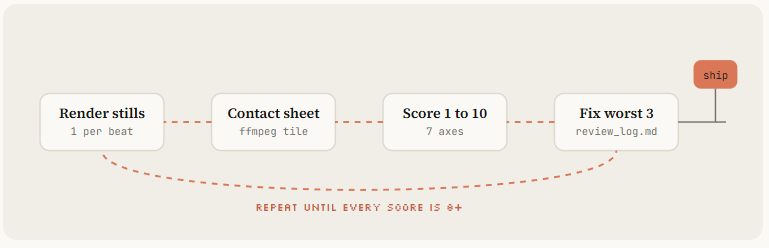
Loop before you show me anything
- Render one frame per beat as a contact sheet and LOOK at it.
- Score it 1-10 on: hook in first 2s, readability at phone size, motion quality, variety, brand accuracy, sound sync.
- Fix the 3 worst problems. Repeat until every score is 8+.
- Only then do the full render.
Opus 5.5 defaults to medium effort and always thinks before answering. Every viral one-shot in the list ran on xhigh or max.
Use medium for small fixes and re-renders, xhigh for new films, max when the first 3 seconds have to carry a launch.
- Part 2 · Prompting like a director
03. One-liner - showreel prompt and why it works
Four of the nine posts used the same sentence. It's worth understanding why a single line produced 15 seconds of camera moves, kinetic type and audio.
python make a dynamic 15-second motion graphics video that shows what an incredible motion designer you are, like it's your showreel for a résumé. go all out.
-
"showreel for a résumé" sets a genre with known rules: fast cuts, a new technique every shot, the best work first. Opus already knows what a reel looks like.
-
"what an incredible motion designer you are" makes the model the subject, so it shows techniques instead of explaining a product. No content to get wrong.
-
"15-second" is short enough to finish in one pass and long enough for 6 to 8 shots.
-
"go all out" works as an effort multiplier on top of xhigh or max.
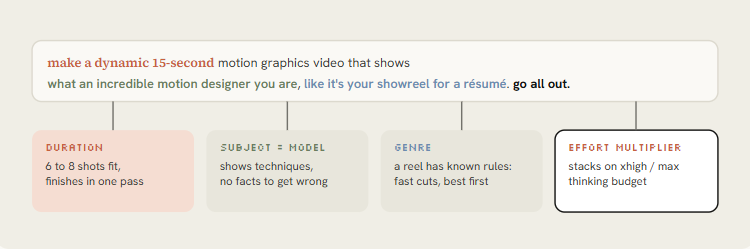
The original 15-second résumé reel on Max effort. The source of the prompt. Put it directly under the anatomy diagram.
Stephan Livera @stephanlivera · Sep 25 Opus 5.5 on Max effort - "make a dynamic 15-second motion graphics video that shows what an incredible motion designer you are, like it's your showreel for a résumé. go all out." 353 832 16K 1.9M
Same prompt on xhigh, one-shot including audio. Shows xhigh is enough, and that the sound was not added in post.
Rob Hallam @robj3d3 · Sep 26 I didn't believe it but this was actually one-shot.
Opus 5.5 on xhigh effort: "make a dynamic 15-second motion graphics video that shows what an incredible motion designer you are, like it's your showreel for a résumé. go all out." Quote Stephan Livera @stephanlivera · Sep 25 0:15 Opus 5.5 on Max effort - "make a dynamic 15-second motion graphics video that shows what an incredible motion designer you are, like it's your showreel for a résumé. go all out." 125 55 768 126K
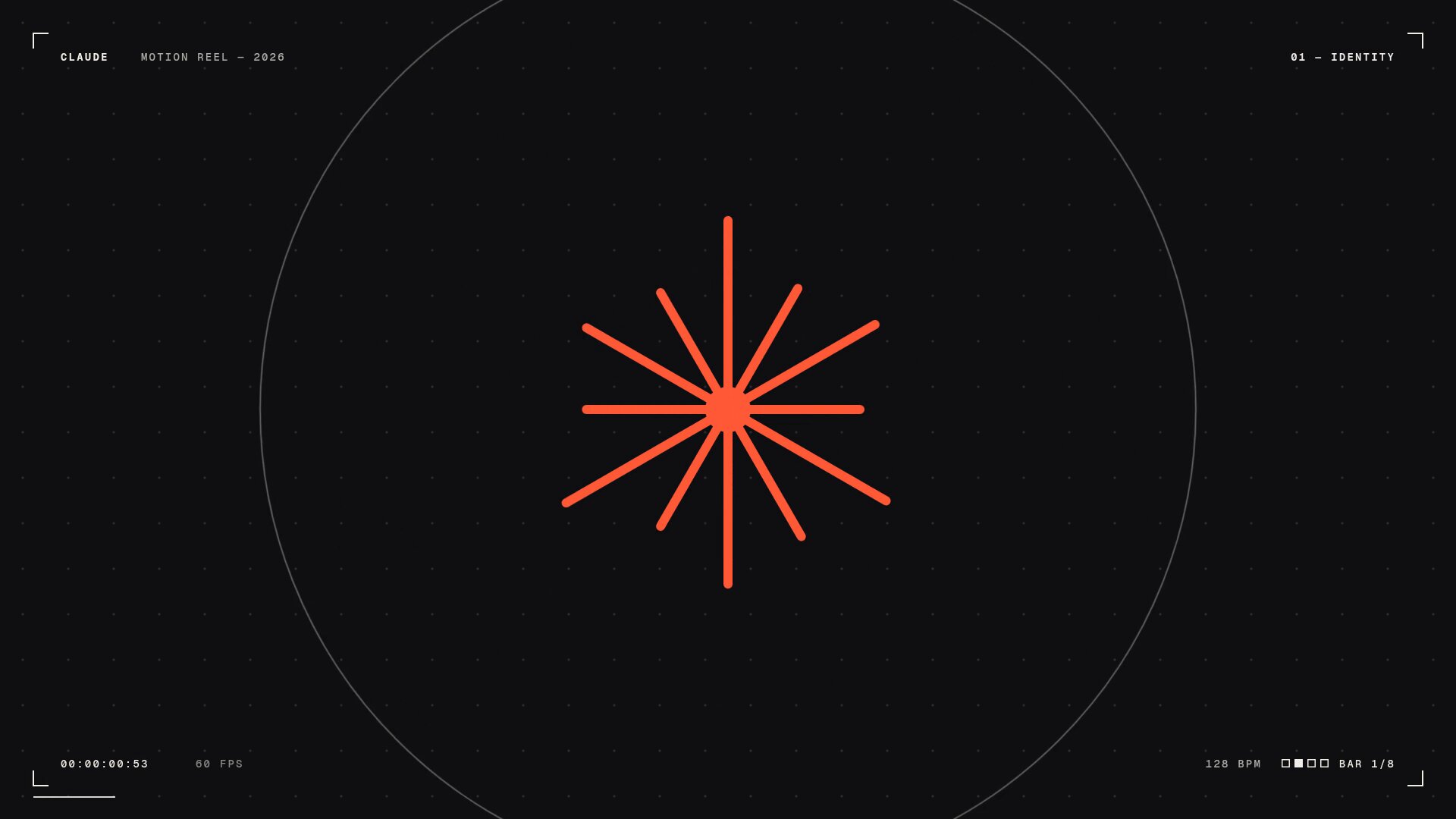
The weakness: the athemeroy dataset calls it "brief contagion". Hundreds of identical prompts produced reels that rhyme with each other. Use it to test your setup, then move on. Variants that shipped and worked:
python
Longer, with a sound bar (pattern from @kloss_xyz's 90-second piano reel)
make a dynamic 16:9, 60-second motion graphics showreel that shows your real creative limits. S-tier sound design, no generic synth pads. Compose an original piano score and sync every cut to it. Export 1080p MP4.
Anti-slop guardrail (pattern from @1littlecoder)
make a dynamic 10-second motion graphics video that introduces who you are as Opus 5.5. Avoid frames and text in the corners, the usual giveaways of AI-made video.
Story instead of techniques (pattern from @sonnylazuardi)
use your showreel energy, but tell a story: the history of [TOPIC] from [START] to today, surprise me with the storyboard. 45 seconds, vertical 9:16.
Agency persona
make a 30-second showreel as if you were a niche branding studio for startup founders. Create every graphic from scratch. One accent color. Every shot is a different technique.
Himanshu @himanshutwtxs · Sep 25 This is INSANE!!
Opus 5.5 on MAX, motion designing in one prompt (sound ON)
prompt- 'make a dynamic 15-second motion graphics video that shows what an incredible motion designer you are, like it's your showreel for a résumé. go all out' 74 80 1.4K 276K
A one-liner tests the engine. It never tests the idea, because it doesn't contain one.
04. Brand - point the reel at your product
Tony Dinh's post is the most useful for anyone selling something. He paid over $1,000 for a similar launch video a year ago; this took under 30 minutes.
Three extra lines did it: the product URL, "use actual product screenshot, logo, assets", and "must have music". Opus went to the site and gathered the assets itself.
Rob Hallam proved the second half: after his first reel, he asked for a product ad in the same chat, and it came out faster because the renderer, audio synth and export pipeline already existed.
Keep one session per brand.
python Make a dynamic 20-second motion graphics video for [PRODUCT] ([URL]), with the energy of a motion designer's showreel. Go all out.
Assets - Visit the site. Use real screenshots (Playwright), the real logo, real colors and fonts. Save everything to ./assets and list what you found before you animate. - Never redraw the product UI from imagination. Crop and animate the real thing.
Story (one beat each, 2 to 4 seconds) 1. Hook: the problem in 5 words of huge kinetic type. 2. The product appears, the UI assembles itself piece by piece. 3. Three features, each as a UI moment with a cursor doing a real action. 4. One number that proves it works: [METRIC]. 5. Logo lockup + [CTA].
Sound - Original music, 120 BPM, synthesized in code. UI clicks and whooshes on the beat.
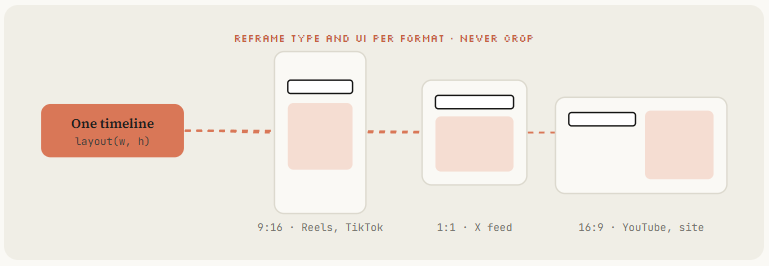
Format: 1080x1920 (9:16) first, then 1:1 and 16:9 from the same timeline. Before the full render, show me a contact sheet of one frame per beat.
- Shows: TypingMind reel in under 30 minutes, replacing a $1,000+ agency video. Full prompt is in the second reply.
Tony Dinh @tdinh_me · Sep 26 Holy shit.
Just 1 year ago, I paid ~$1,000+ for a video like this.
Now I made this with Opus 5.5 in less than 30 minutes 89 40 957 187K
-
Why here: Place under the brand prompt so readers can compare his 3 extra lines with the template.
-
Shows: Pocketsflow reel with a talking character voiced through ElevenLabs.
Chain @achxvi · Sep 26 Opus 5.5 did this in 15 minutes
This is INSANE 248 465 8.3K 823K
- Why here: Illustrates the voice + mascot upgrade in the next paragraph.
achxvi took the same idea further with a talking character: the Pocketsflow version passed an ElevenLabs key and asked for a character who explains the product. Voice plus mascot is what he now sells as a service.
Put API keys in .env and write "the ElevenLabs key is ELEVENLABS_API_KEY in .env". Never paste a real key into a prompt you'll screenshot. achxvi's public prompt used a joke placeholder for exactly this reason.
05. Reference - name a look, feed a frame
Without a reference, Opus falls back to its default: centered text, gradient background, everything fading in.
Rexan Wong went through dozens of viral clips and found the same thing: naming a style beats describing one, and a reference video or frame gives the model pacing, type and transitions to copy.
Pleometric's two posts show the ladder. The pure-code TikTok piece started from a single frame of another viral animation.
The Donald-style piece pointed Opus at his own PC-98 image gallery. Your own library is a reference nobody else can copy.
-
A frame: screenshot one frame of a video you love, attach it, say what to take (palette, type, grain) and what not to take (subject).
-
A video: give Opus the file or link and ask it to extract frames with ffmpeg and describe pacing shot by shot before writing code.
-
A library: a folder of your images or past work. Ask Opus to write a style_guide.md from it first.
-
Sources: whatships.com (launch videos), Dribbble motion, your competitors' launch films.
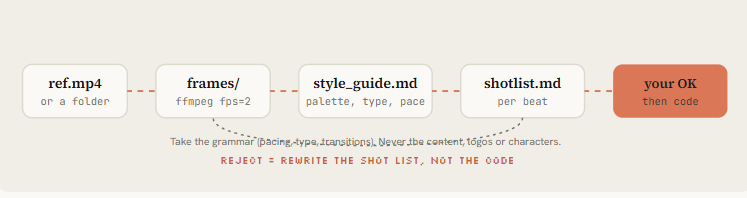
python Reference: ./refs/launch.mp4 (and ./refs/frames/*.png)
- Extract one frame every 0.5s with ffmpeg. Study them.
- Write ./docs/style_guide.md: palette (hex), type (family, weight, tracking), shot lengths, transition types, camera moves, texture/grain, how text enters and exits.
- Write ./docs/shotlist.md for a [DURATION]s video about [SUBJECT] in THAT style. Take the grammar of the reference, never its content, logos or characters.
- Show me both files. Wait for my OK before any code.
Pleometric suggested p5.js and Opus chose to write its own paper renderer. When you give a reference, let the model pick the technique.
Specify the look and the constraints, not the library, unless you need a specific framework for reuse.
Shows: Why most "one prompt" videos look the same, and the reference + framework + components fix.
Rexan Wong @rexan_wong · Sep 26 everyone's sharing motion graphic videos that Opus 5.5 made, and it's genuinely insane
everyone says they created it with "one prompt", but my one prompt video looked mid
so i went through a bunch of these videos to see how they were actually made, and found the workflow that Show more 134 596 6.6K 588K
"Its TikTok feed" animation, pure code, started from one frame of another viral piece. The single-frame reference in action.
Pleometric @pleometric · Sep 23 I asked Opus 5.5 to make an animation of what its TikTok feed looked like 102 273 3.7K 406K
06. Spec - write the state list, not the vibe
The most-bookmarked prompt of the week wasn't a one-liner.
@twoclipping's UI morph (907K views, 19K bookmarks) and @verbove's MakerMap film both used an XML spec: inputs to ask for, direction, a beat-by-beat state list, build rules, and gotchas. NFT_Chen's editor film is the same idea as a story: a fake UI is a set where every element has a known state.
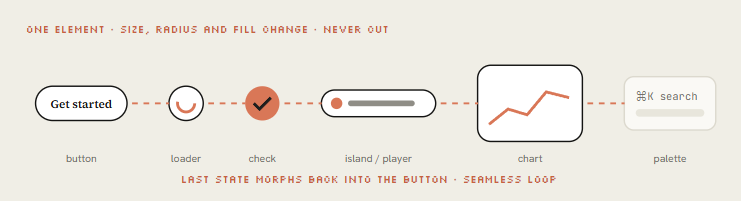
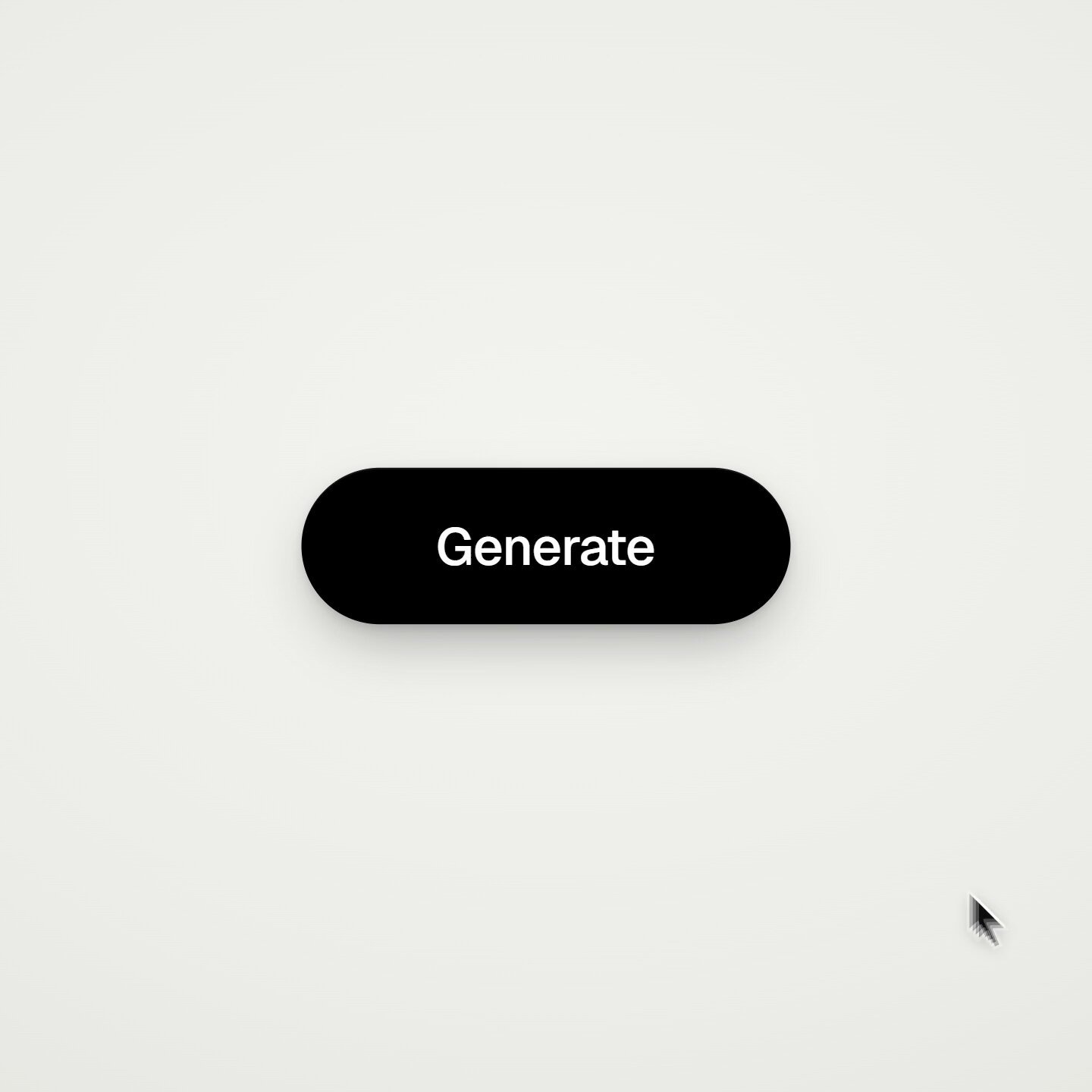
The concept behind them: one shape, never cut. A single element morphs size, radius and color from state to state (button, loader, player, slider, chart, command palette), a cursor drives each change with real clicks, and the last frame equals the first so it loops.
Here is my own template built on that structure; the originals are linked in the resources.
python <inputs> Ask me for: my product + URL, 8 to 12 UI states that tell its story, the real data shown in each state, brand colors + fonts + one accent, a royalty-free track near 120 BPM, formats. </inputs>
<direction> Product-film UI motion. One container never cuts: every state is the same element changing size, radius and fill while its content swaps behind a short blur. A cursor drives every change. Warm neutral canvas, one accent. Springs with at most a tiny overshoot. Banned: bouncy easing, glows, gradients on UI chrome, particle bursts, dead time. </direction>
<structure> 120 BPM, 8 bars, something happens on every beat. logo → CTA button → email field (typed) → loader → success check → dashboard card → chart draws itself → tooltip on hover → ⌘K palette → toast → logo. </structure>
<build> 1. One HTML file, one canvas, window.seek(t). No CSS transitions, no timers, no carried state. 2. Closed-form springs. A value with many targets = sum of one spring per change. 3. Text inside a morphing container enters after the morph starts, leaves before the next one. 4. Tab indicators: leading and trailing edges on different springs so they stretch. 5. Beat grid from the track (numpy/librosa). Start on a downbeat. UI sounds on measured peaks. 6. Render in headless Chrome at 60 fps, 4 subframes per frame, blended for motion blur. </build>
<gotchas> Never use will-change on anything the camera scales (blurry text). The last frame must equal the first, cursor position and velocity included. </gotchas>
<start> Ask for the inputs, then show me the state list on the beat grid before writing code. </start>
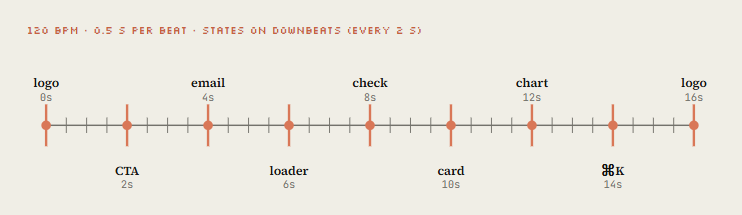
The UI morph loop (907K views) with the open-sourced XML template in the thread. The original of the spec pattern. Put it right after Fig 2.
zero @twoclipping · Sep 24 opus 5.5 is f*cking cracked at motion design
this entire video is code, 0 after effects
im open sourcing the prompt template for these motion designs
steal it to recreate these ↓
<inputs> Ask me for: 8 to 12 UI states I want the shape to become (e.g. button, loader, player, Show more 256 755 11K 971K
MakerMap: one shape morphing through the whole product, real data, one HTML file. Shows the same spec applied to a real product.
Martijn Verbove @verbove · Sep 25 Opus 5.5 is absolutely cracked at motion design
this entire video is code
0 After Effects 0 manual animation
I showed it one viral motion post and said:
“explain MakerMap, but make it insane”
it came back with 20 seconds of one shape morphing through the entire product: Show more 8 15 214 16K
Opus codes a cartoon video editor and edits inside it: timeline, waveform, export button, all drawn.
SuSu_酥酥 @NFT_Chen · Sep 23 无敌了!Opus 5.5 自己写了一套卡通剪辑软件,然后钻进去剪完了!
不走视频模型,纯程序,code2video!
Claude 小人站在时间轴上:
日出 → 热咖啡 → 三只猫 → 自己跳舞。
伸手把 Sparkle 拉到 70%,咔一声 SNIP!,音轨lyric_track.wav 还在下面抖。
文件名已经是 Show more Quote SuSu_酥酥 @NFT_Chen · Sep 23 1:44 惊了!Claude Opus 5.5 盖出的雨夜街角便利店,细节密到像能走进去买关东煮!
亮眼表现: 雨夜氛围一次成型:湿路面反光、路灯光锥、电线杆、凸面镜、屋檐滴水全对上
街角空间逻辑清楚:自动门、分类垃圾桶、自行车、招牌、人行道指示一次铺齐 x.com/nft_chen/statu… 46 155 1.4K 435K
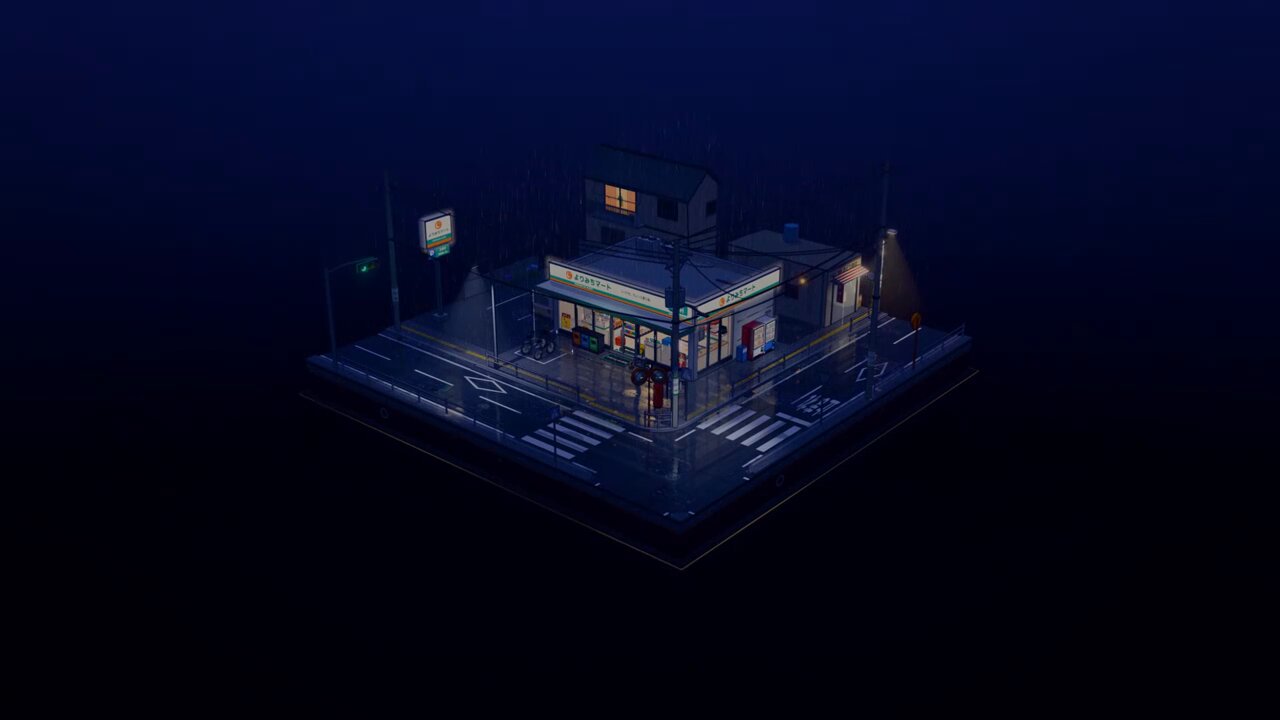
UI as a film set, the story version of the spec approach.
- Part 3 · Build the engine
07. Engine - build the seek(t) renderer
This is route A, the one Opus picks by default, written out cleanly. Two files. The page paints any moment on demand, the renderer walks time and pipes frames into ffmpeg.
python <style>html,body{margin:0;background:#141413}canvas{display:block}</style> <canvas id="c" width="1080" height="1920"></canvas> <script> const W = 1080, H = 1920, DUR = 15; const g = document.getElementById('c').getContext('2d'); const clamp = (x, a = 0, b = 1) => Math.min(b, Math.max(a, x));
// Closed-form damped spring, 0 → 1. Pure function of time (step 08 explains it). function spring(t, k = 170, d = 26) { if (t <= 0) return 0; const w0 = Math.sqrt(k), z = d / (2 * w0); if (z < 1) { const wd = w0 * Math.sqrt(1 - z * z); return 1 - Math.exp(-z * w0 * t) * (Math.cos(wd * t) + (z * w0 / wd) * Math.sin(wd * t)); } return 1 - Math.exp(-w0 * t) * (1 + w0 * t); // z >= 1 treated as critical }
// Seeded noise, never Math.random: the render must be identical every run function rng(seed) { return () => { seed |= 0; seed = seed + 0x6D2B79F5 | 0; let t = Math.imul(seed ^ seed >>> 15, 1 | seed); t = t + Math.imul(t ^ t >>> 7, 61 | t) ^ t; return ((t ^ t >>> 14) >>> 0) / 4294967296; }; }
const SCENES = [ { from: 0, to: 3, draw(t) { // kinetic title const s = spring(t - 0.1, 220, 22); g.save(); g.translate(W / 2, H / 2); g.scale(0.6 + 0.4 * s, 0.6 + 0.4 * s); g.globalAlpha = clamp(t * 4); g.fillStyle = '#F0EEE6'; g.font = '700 190px "Source Serif 4", serif'; g.textAlign = 'center'; g.fillText('MOTION', 0, 0); g.fillStyle = '#D97757'; g.fillRect(-320 * s, 50, 640 * s, 18); g.restore(); }}, { from: 3, to: 6, draw(t) { // grid of squares on a stagger const r = rng(7); for (let i = 0; i < 48; i++) { const x = (i % 6) * 170 + 115, y = Math.floor(i / 6) * 170 + 360; const s = spring(t - i * 0.03 - r() * 0.1, 260, 20); g.fillStyle = i % 7 ? '#F0EEE6' : '#D97757'; g.fillRect(x - 60 * s, y - 60 * s, 120 * s, 120 * s); } }}, // ... more scenes: Opus appends here, one object per shot ];
function draw(t) { g.fillStyle = '#141413'; g.fillRect(0, 0, W, H); for (const s of SCENES) if (t >= s.from && t < s.to) s.draw(t - s.from); } window.seek = (t) => { draw(t); return true; };
// Live preview in a normal browser, off during headless render if (!navigator.webdriver) { const t0 = performance.now(); (function loop() { draw(((performance.now() - t0) / 1000) % DUR); requestAnimationFrame(loop); })(); } </script>
python // node render.mjs --fps 60 --dur 15 --sub 4 import { chromium } from 'playwright'; import { spawn } from 'node:child_process'; import { mkdirSync } from 'node:fs';
const arg = (k, d) => { const i = process.argv.indexOf('--' + k); return i > 0 ? Number(process.argv[i + 1]) : d; }; const FPS = arg('fps', 60), DUR = arg('dur', 15), SUB = arg('sub', 4); mkdirSync('out', { recursive: true });
const browser = await chromium.launch(); const page = await browser.newPage({ viewport: { width: 1080, height: 1920 }, deviceScaleFactor: 1 }); await page.goto('file://' + process.cwd() + '/index.html'); await page.evaluate(() => document.fonts.ready); // canvas text needs loaded fonts
// tmix averages SUB consecutive subframes; select keeps the last of each group
const vf = tmix=frames=${SUB},select='eq(mod(n\\,${SUB})\\,${SUB - 1})',setpts=N/${FPS}/TB;
const ff = spawn('ffmpeg', ['-y', '-f', 'image2pipe', '-framerate', String(FPS * SUB), '-i', '-',
'-vf', vf, '-r', String(FPS), '-c:v', 'libx264', '-crf', '16', '-pix_fmt', 'yuv420p', 'out/silent.mp4'],
{ stdio: ['pipe', 'inherit', 'inherit'] });
const total = Math.round(DUR * FPS * SUB);
for (let i = 0; i < total; i++) {
await page.evaluate((t) => window.seek(t), i / (FPS * SUB));
const png = await page.locator('#c').screenshot({ type: 'png' });
if (!ff.stdin.write(png)) await new Promise((r) => ff.stdin.once('drain', r));
if (i % (FPS * SUB) === 0) console.log(rendered ${i / (FPS * SUB)}s / ${DUR}s);
}
ff.stdin.end();
await new Promise((r) => ff.on('close', r));
await browser.close();
Prefer a framework? Same prompt, route B
python
Remotion (React): best for series, templates, data-driven videos
npx create-video@latest launch-film && cd launch-film npx skills add remotion-dev/skills claude > /remotion-create a 20s 9:16 launch film for [PRODUCT], springs only, one accent color npx remotion studio # live timeline preview npx remotion render Main out/launch.mp4
HyperFrames (HTML + GSAP): best when you think in web pages
npx hyperframes init my-video && cd my-video npx hyperframes skills update claude > Using /hyperframes, turn ./notes.md into a 45-second pitch video with kinetic captions npx hyperframes preview && npx hyperframes render
08. Springs - make motion feel expensive
Cheap motion eases from A to B on a fixed curve. Expensive motion has mass: it accelerates, overshoots a hair, settles.
The morph films all specify closed-form springs because they stay a pure function of time, which keeps seek(t) deterministic.
The trick that most people miss: when a value changes target several times (a cursor, a container's width), you don't restart the spring.
You add one spring per change, each starting at its own time. The motion stays continuous, and you can still render frame 812 without simulating frames 0 to 811.
python // keys: [[time, value], ...] sorted by time. Returns the value at t. export function track(t, keys, k = 170, d = 26) { let v = keys[0][1]; for (let i = 1; i < keys.length; i++) v += (keys[i][1] - keys[i - 1][1]) * spring(t - keys[i][0], k, d); return v; }
// A tab indicator that stretches: leading edge is stiffer than trailing edge export function indicator(t, stops) { // stops: [[time, x], ...] const lead = track(t, stops, 320, 30); const trail = track(t, stops, 140, 22); return { left: Math.min(lead, trail), right: Math.max(lead, trail) + 120 }; }
// Text inside a morphing box: in after the morph starts, out before the next one export function swapAlpha(t, tIn, tOut) { return Math.min(clamp((t - tIn - 0.08) / 0.12), clamp((tOut - 0.1 - t) / 0.1)); }
// Seamless loop: pin the last frame to the first export const loopT = (t, dur) => ((t % dur) + dur) % dur;
-
Snappy UI: buttons, toggles, leading edges
-
Default: cards, containers, camera
-
Heavy: big type, 3D objects, logo lockups
-
Playful: mascots, stickers (visible overshoot)"
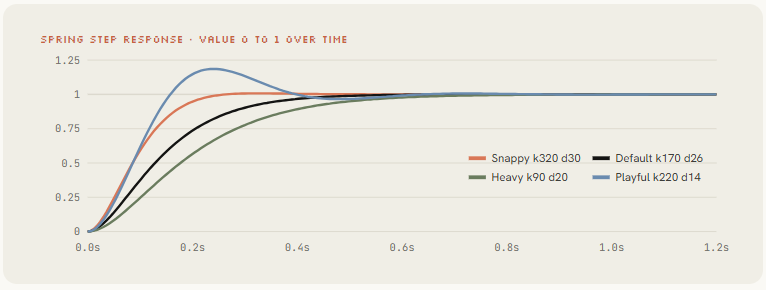
Replace every easing curve with closed-form springs from lib/motion.js. Tiny overshoot on UI, none on type. Any value with more than one target uses track()." Opus refactors the whole file in one pass.
09. Sound - score it to the beat
Rob Hallam thought the audio was added in post. It wasn't.
@oozn's Steve Jobs film synthesized its soundtrack in Node with every cut locked to 120 BPM
Vox's "small print" piece synthesized music in Python and then polished the render second by second against it. Sound is where "AI video" starts feeling like a film.
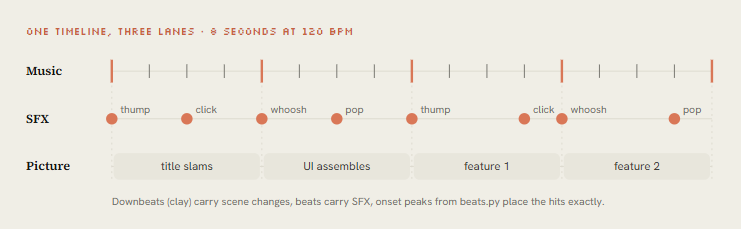
Two paths. If you supply a track, measure it. If you don't, synthesize it on the same timeline as the picture.
python
python beats.py song.wav > beats.json (the animation reads this file)
import sys, json, numpy as np, librosa
y, sr = librosa.load(sys.argv[1], sr=None, mono=True) tempo, frames = librosa.beat.beat_track(y=y, sr=sr, units="frames") beats = librosa.frames_to_time(frames, sr=sr).round(3).tolist()
onset = librosa.onset.onset_strength(y=y, sr=sr) peaks = librosa.util.peak_pick(onset, pre_max=3, post_max=3, pre_avg=3, post_avg=5, delta=0.5, wait=10) json.dump({ "bpm": float(np.atleast_1d(tempo)[0]), "beats": beats, # state changes go here "downbeats": beats[::4], # big moments go here "hits": librosa.frames_to_time(peaks, sr=sr).round(3).tolist(), # SFX go here }, sys.stdout, indent=1)
python // node sfx.mjs cues.json out/sfx.wav cues: [{"t":0.5,"type":"click"}, ...] import { readFileSync, writeFileSync } from 'node:fs'; const SR = 48000, cues = JSON.parse(readFileSync(process.argv[2], 'utf8')); const buf = new Float32Array(Math.ceil((Math.max(...cues.map(c => c.t)) + 2) * SR));
let s = 42; const noise = () => (s = (s * 1664525 + 1013904223) >>> 0) / 2147483648 - 1; const VOICES = { click: [0.05, t => Math.sin(2 * Math.PI * 1800 * t) * Math.exp(-t * 90) * 0.5], pop: [0.15, t => Math.sin(2 * Math.PI * (600 + 900 * t) * t) * Math.exp(-t * 30) * 0.4], thump: [0.50, t => Math.sin(2 * Math.PI * (90 - 60 * t) * t) * Math.exp(-t * 9) * 0.9], whoosh: [0.35, t => noise() * Math.sin(Math.PI * Math.min(1, t / 0.35)) * 0.25], }; for (const c of cues) { const [len, fn] = VOICES[c.type], start = Math.floor(c.t * SR); for (let i = 0; i < len * SR && start + i < buf.length; i++) buf[start + i] += fn(i / SR); }
const n = buf.length, b = Buffer.alloc(44 + n * 2); // 16-bit mono WAV b.write('RIFF', 0); b.writeUInt32LE(36 + n * 2, 4); b.write('WAVEfmt ', 8); b.writeUInt32LE(16, 16); b.writeUInt16LE(1, 20); b.writeUInt16LE(1, 22); b.writeUInt32LE(SR, 24); b.writeUInt32LE(SR * 2, 28); b.writeUInt16LE(2, 32); b.writeUInt16LE(16, 34); b.write('data', 36); b.writeUInt32LE(n * 2, 40); for (let i = 0; i < n; i++) b.writeInt16LE(Math.round(Math.max(-1, Math.min(1, buf[i])) * 32767), 44 + i * 2); writeFileSync(process.argv[3], b);
Steve Jobs biopic: Remotion + SVG, 23 transitions, soundtrack synthesized in Node, cuts on 120 BPM.
Proof that code-synthesized music can carry a 2-minute film.
onur ozcan @oozn · Sep 25 opus 5.5 one shotted this animation of steve jobs life
after seeing its animating capabilities i got curious and asked it to tell the story of steve jobs as an animation.
2 minutes, one prompt, built entirely in code:
→ remotion + react + svg, ~8.7k lines → jointed Show more 6 13 204 18K
"Small print": story, frames and music all by Opus, rendered with HyperFrames. Python-synthesized music, then a second-by-second polish pass.
Vox @Voxyz_ai · Sep 22 holy shit, opus 5.5 is kind of insane at animation. i didn't write a single line of code. it wrote the story, drew every frame, and made the music. no image assets at all, it's all JS.
the story is called "small print": claude gets a pile of requests every day. it circles the Show more Quote Vox @Voxyz_ai · Sep 22 bro opus is so back.
i still remember when opus 4.5 was my favorite model to talk to in openclaw, and opus 4.6 was my favorite for writing.
then everything changed.
until today. opus 5.5 is the most comfortable model i've written with since 4.6. not even fable gave me that. 28 70 948 123K
- Part 4 · From one clip to a studio
10. Overnight - write the director's brief
Donald dictated for five minutes, went to sleep, and woke up to a 142-second music video with 2.1M views.
His public prompt runs about 9,500 characters. @pradeepXkapoor's "Pip" robot film used a 19,000-character brief. Read either and you see the same skeleton: they don't describe a video, they hire a crew.
-
Film in one line. The logline and the joke, so every decision can be checked against it.
-
References. Source video, song, image library, a GitHub repo of prior work. What to keep, what to push.
-
Tools & keys. Skills to load, APIs available (image, video, voice), budget, where docs live. "Spend it economically."
-
Character bible. Proportions, palette sampled from a sheet, expressions, an identity lock that survives every style change.
-
Beat sheet. Acts with timestamps, a visual payoff every 3 to 5 seconds, a hook in the first 2.
-
Text on screen. When lyrics or captions go huge, when they sit like subtitles. Composition leaves room for them.
-
Workflow gates. Plan → rig → stills → animatic → full pass → polish → audio → render. Don't skip gates.
-
Critique loop. Render stills, score them, write the 3 worst problems, fix, repeat until every score is 8+.
-
Deliverables. Final MP4, loop check, poster frame, contact sheet, clean source with a README
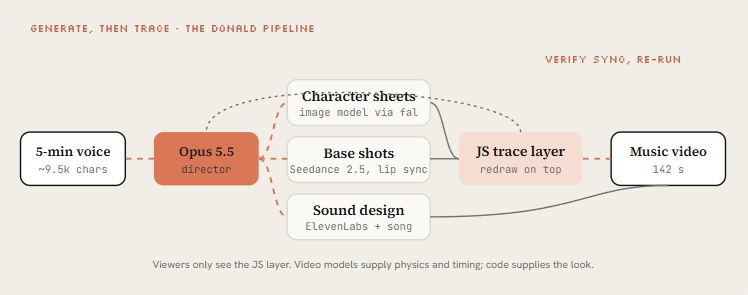
The key move in Donald's brief is generate-then-trace. Seedance 2.5 renders base shots with characters and physics, then Opus redraws the whole video in JavaScript on top, so the viewer only sees the code-drawn layer.
Video models give motion that's hard to hand-code; the JS layer gives a consistent, ownable look. Pleometric re-ran the same brief with his own gallery and got a completely different film.
Spoke to my computer for 5 mins, Claude worked for 12 hours." The Claude Pop music video, 2.1M views. The headline example of L4.
donald @donaldjewkes · Sep 23 I made this with one prompt using Opus 5.5
I spoke to my computer for 5mins, claude worked for 12 hours, and I woke up to this
full prompt: Quote NotinReality @other__reality · Sep 22 2:36 Claude Opus 5.5 has the best visual design of any model I have tested so far x.com/slimer48484/st… 433 1.2K 10K 3.5M

The full ~9,500-character dictated brief. Readers compare it against the director-brief template below.
donald @donaldjewkes · Sep 23 Replying to @donaldjewkes I've included an MP4 file and an original link to a video that is called "Claude Pop." It's a pop song that is about increasing rate of progress and the experience of the singularity approaching.
I want you to independently do an end-to-end complete pass on making an updated Show more Quote NotinReality @other__reality · Sep 22 Claude Opus 5.5 has the best visual design of any model I have tested so far x.com/slimer48484/st… 64 158 2K 546K
Donald's brief re-run with a PC-98 gallery; a mixed flow with bugs left in to keep it one-pass.
Pleometric @pleometric · Sep 24 This video inspired me to really push Opus 5.5 and test its limits.
I followed the general workflow Donald described here and the results are great Quote donald @donaldjewkes · Sep 23 2:21 I made this with one prompt using Opus 5.5
I spoke to my computer for 5mins, claude worked for 12 hours, and I woke up to this
full prompt: x.com/other__reality… 163 537 4.6K 620K
python You are the director, animator, sound designer and render engineer for a [DURATION] film made in code. Treat this as a multi-session production. Don't rush to a final render.
The film in one line
[LOGLINE. What the viewer should feel at the end.]
References and inputs
- ./refs/ : [video / frames / image library]. Take the grammar, never the content.
- ./audio/track.wav : use it unchanged. Measure beats with beats.py first.
- Skills available: [/remotion-best-practices | /hyperframes | /claude-animation].
- APIs in .env: [ELEVENLABS_API_KEY, FAL_KEY]. Budget: [$X]. Be economical.
Look
[3-5 lines: palette, type, texture, camera language. Banned looks.]
Beat sheet
0:00-0:02 hook: [the single most striking image] 0:02-0:10 [act 1] ... a new visual payoff every 3-5 seconds [END] the last frame sets up the first frame (loop)
Workflow, with gates
- Write docs/style_guide.md and docs/shotlist.md (every shot: frames, camera, text, SFX). Show me the shot list. Then continue without waiting if I don't answer in 10 minutes.
- Build stills for every shot. Contact sheet. Critique.
- Animatic at 960x540 with placeholder audio. Fix pacing before polish.
- Full animation, polish pass, sound pass, final render.
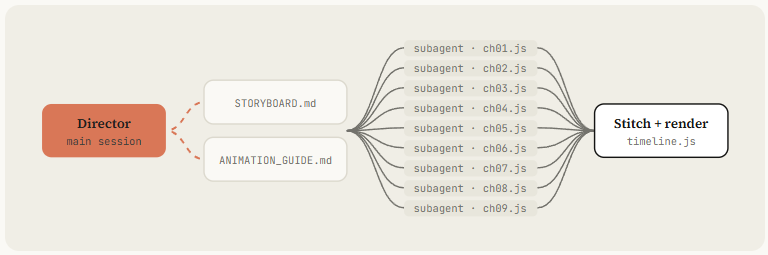
- Split work across subagents per chapter. Write docs/ANIMATION_GUIDE.md first so every subagent codes in the same style.
Critique loop (every shot, at least 3 rounds)
Render 3-5 stills, score 1-10 on: hook, readability at 360px wide, motion, composition, depth, sound sync, polish. Log scores + 3 biggest problems in docs/review_log.md. Fix. Repeat until all are 8+.
Deliverables
out/final.mp4 · out/loop_check.mp4 · out/poster.png · out/contact.png · README.md
John Heibel's PDoom repo (1.1K stars) shows the subagent pattern for real: Opus wrote ANIMATION_GUIDE.md to brief the subagents it ran in parallel and STORYBOARD.md after the first generation, with nine chapters in src/ch/. Ask for both files by name.
11. Critique - make Opus watch its own frames
Opus 5.5 reads images. That means it can look at what it rendered, and this single habit separates the clips that went viral from the ones posted with "it's a bit mid".
@mablesjoseph's watercolor short was upfront about it: 163 model calls and nearly seven hours, not one shot. Drew's launch-day piece had visible cleanup rounds too. Iteration is the method, not a failure.
python
Contact sheet: 2 frames per second, 6 across
ffmpeg -i out/final.mp4 -vf "fps=2,scale=270:-1,tile=6x5" -frames:v 1 out/contact.png
Strip: 12 consecutive frames around a fast action at 4.2s (catch pops and overlaps)
ffmpeg -ss 4.1 -i out/final.mp4 -vf "scale=320:-1,tile=12x1" -frames:v 1 out/strip.png
Phone test: how it reads at 360 px wide
ffmpeg -i out/final.mp4 -vf "fps=1,scale=360:-1,tile=5x3" -frames:v 1 out/phone.png
Loop check: play it twice back to back and watch the seam
ffmpeg -stream_loop 1 -i out/final.mp4 -c copy out/loop_check.mp4
Determinism check: frame 300 rendered twice must hash the same
node render.mjs --dur 5 --fps 60 --sub 1 && md5 out/silent.mp4 # run twice, compare
python Open out/contact.png, out/strip.png and out/phone.png and look at them properly. Be a harsh motion director, not a proud author.
Score 1-10: hook in first 2s · readability at phone size · motion quality (springs, no dead frames) · variety (new thing every 2-4s) · composition · brand accuracy · sound sync.
List the 3 biggest problems with timestamps. Hunt specifically for: text overlapping during swaps, anything sliding instead of easing, corner labels and frame borders, centered-on-gradient shots, blurry scaled text, a dead beat with nothing happening, a stutter at the loop seam.
Fix them, re-render only the affected seconds, show me the new contact sheet and new scores.
Launch-day piece, 1.7M views, with visible cleanup rounds. Iteration is the method. Pair it with the next embed.
DreW @devteamdrew · Sep 22 Made with @claudeai Opus 5.5 340 543 9.6K 1.7M
Watercolor short, openly not one-shot: 163 model calls, about 6¾ hours. The honest counterweight to "one prompt" claims.
Mable Joseph @mablesjoseph · Sep 25 I made a 45-second hand-painted animated short-film with Opus 5.5
No animation software. Every brushstroke, watercolour wash and sound effect is generated in code.
Does Opus 5.5 absolutely cook in one shot, not really ? It's good but still needs a good supporting project.
The Show more 18 14 154 11K
12. Ship - formats, a skill, and a service
Three last moves turn a good clip into a repeatable business. Export every format from one timeline. Package your pipeline as a skill so the next video is a sentence. And, if you want, do what achxvi did the same week: sell it.
Every format from one timeline
Write the scenes against a layout function, not fixed pixels, and ask Opus to render 9:16, 1:1 and 16:9 in parallel.
The MakerMap spec asked for exactly this. Reframe type and UI per format, don't crop a 16:9 render to vertical.
Package it as a skill
python
name: motion-reel description: Make a product or showreel motion video rendered from code. Use when the user asks for a launch video, showreel, product reel, animated explainer or motion ad.
Motion reel
Inputs to collect first
Product + URL, duration, formats (9:16 / 1:1 / 16:9), brand colors + fonts, a reference (frame, video or image folder), music (file or "synthesize").
Pipeline
- Gather assets from the URL with Playwright into ./assets. List them.
- If a reference exists, write docs/style_guide.md from it.
- Measure or synthesize music. beats.py → beats.json.
- Write docs/shotlist.md on the beat grid. Show it and wait for OK.
- Build index.html with window.seek(t) using lib/motion.js springs. Follow CLAUDE.md.
- Contact sheet → critique-pass (see prompts/critique-pass.txt) → fix. 3 rounds minimum.
- node render.mjs → sfx.mjs → mix to -14 LUFS → out/final.mp4, all formats.
- Deliver final.mp4, contact.png, poster.png. Say what you'd improve next.
Hard rules
- Real product UI only. Never invent screens.
- No Math.random, no timers, no CSS transitions in render mode.
- Banned: corner labels, centered title on gradient, everything fading in.
Now the whole course collapses into /motion-reel for [URL], 20s, vertical, reference ./refs/frame.png. Share the skill folder with your team or publish it as a plugin like buildwithhanif did.
Turn it into revenue
achxvi's offer is a good template: music, a mascot in any style, product features, an offer at the end, any language, up to 3 edits.
Tony Dinh's number anchors the price: people paid around $1,000 for this a year ago. A skill plus a critique loop lets you deliver in an afternoon.
Chain @achxvi · Sep 27 Opus 5.5 did this in 45 minutes
It's INSANE 35 36 647 54K
38-second vertical product film in 45 minutes, plus the reply offering it as a paid service. The "turn it into revenue" proof. Place directly under this paragraph.
Repos to clone
-
Music video: https://github.com/JohnHeibel/PDoomVideo
-
Starter: https://github.com/JohnHeibel/ClaudeAnimationBase
-
Node canvas: https://github.com/buildwithhanif/claude-animation-skill
-
Framework (html): https://github.com/heygen-com/hyperframes
-
Framework (react): https://www.remotion.dev/docs/ai/skills
-
Long form: https://github.com/WinterArc21/Battle-of-Austerlitz-Film
-
Prompt library: https://github.com/guanmo-ai/awesome-ai-motion
-
Dataset: https://github.com/athemeroy/awesome-opus-5-5-videos
Conclusion:
The one-liner gets you a clip. The harness gets you a studio.
Install the stack, steal a reference, write the state list, own the seek(t) engine, and make Opus watch its own frames until every score is 8.
Then package it as a skill and never write the long prompt again.
Follow my Substack to get the latest articles on AI, vibe-coding, and agentic systems.