How to Use Grok Bot to Build a Team of AI Trading Agents
I will break down the EXACT framework to build a 24/7 AI trading team with Grok Bot that researches the market, finds strategies, backtests & trades on its own.
Let's get straight to it.
Bookmark This - if you're building an AI/tech product, your product is not the problem, your distribution is. At 0x9.fun we make your AI product WIN on X with launches & long-form builds exactly like this one. DM me to launch your next campaign with 0x9 .
And if you’re a CREATOR, get paid to post JOIN HERE.
If you are building an AI trading system right now, DM me your setup and i will personally review the first 20. MOVE FAST.
Something big is happening on the timeline right now and MOST traders have not noticed it yet.
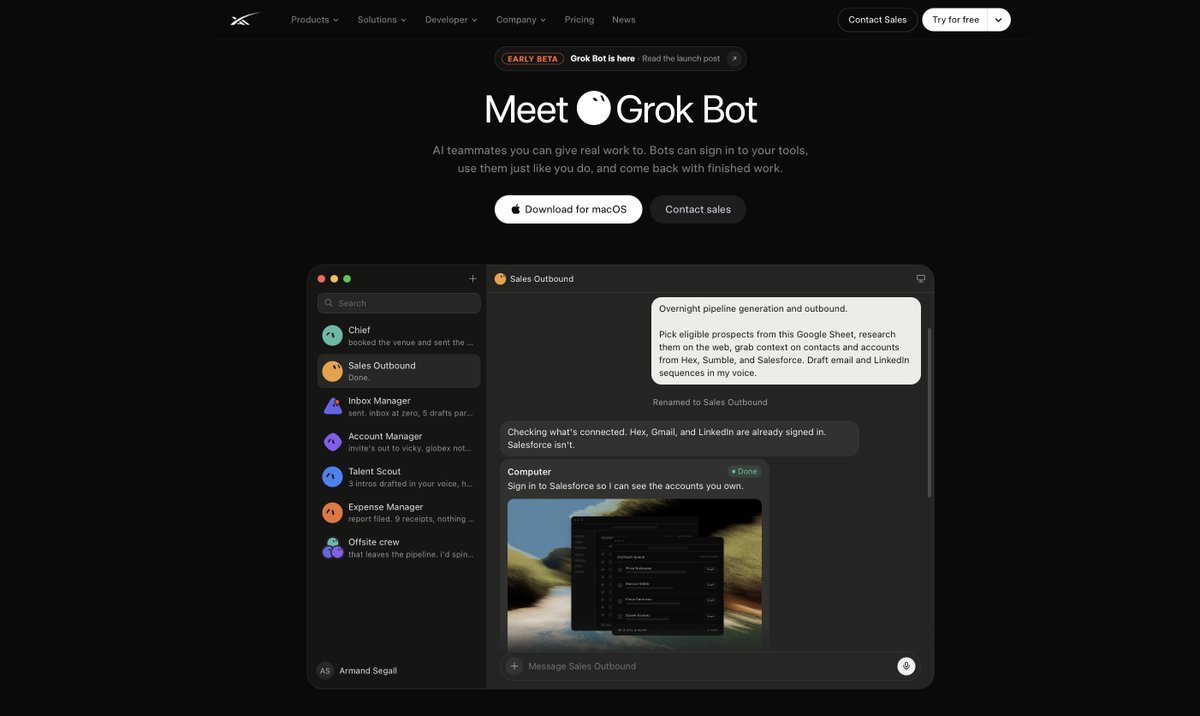
People are using Grok Bot to automate their entire lives: their inbox, their calendar, their research and their sales.
Founders are running whole companies with it. One person at the top, a team of Bots doing the real work below.
Each Bot gets its own computer in the cloud. It signs into the same tools you use and it never logs off.
It remembers your rules, works on a schedule, talks to the other Bots and only comes back when it needs your yes.
THIS IS WHAT YOU WILL BUILD TODAY
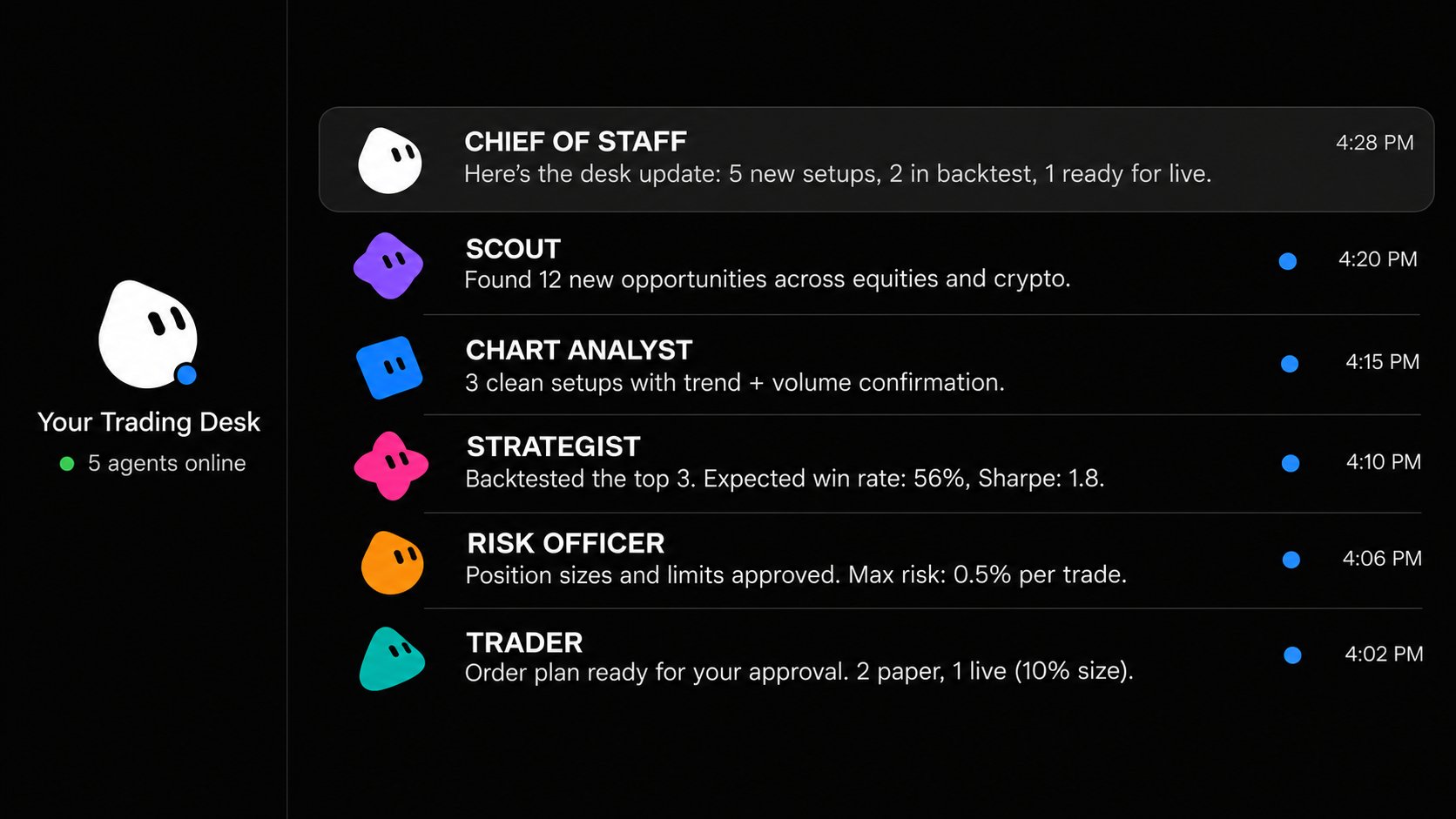
Now picture that same team pointed at the markets instead of an inbox.
An AI team that researches the market around the clock, spots the mispricing, turns it into a strategy, backtests it on years of data and builds the trading bot that executes it, all while you sleep.
That is not a chatbot anymore.
That is a full trading desk plugged straight into your TradingView, reading your charts, running your screener and watching your alerts 24/7.
Funds pay MILLIONS for exactly this structure: researchers, analysts, risk managers and execution traders, all on one floor, working in shifts.
You can build the same structure tonight, for the price of one monthly subscription, without writing a single line of code.
This article is the full build, from an empty app to a team that researches, analyzes and trades on its own.
By the end of this article you will know:
-
How to hire a complete AI trading team with one Chief of Staff running it
-
How to plug Grok Bot into your TradingView so it reads your charts, runs your screener and manages your alerts
-
How to make it build your own premium style TradingView indicators, without paying for a single one
-
How to wire in a broker and run the entire desk 24/7, first on paper, then with real money
-
What this setup CAN & CANNOT do, stated clearly enough to hold me to
Let's get into it.
Part 1: What Grok Bot Is and Why It Changes AI Trading
Every AI model or LLM before this worked the same way. You type. It answers. It stops.
What Grok Bot Is
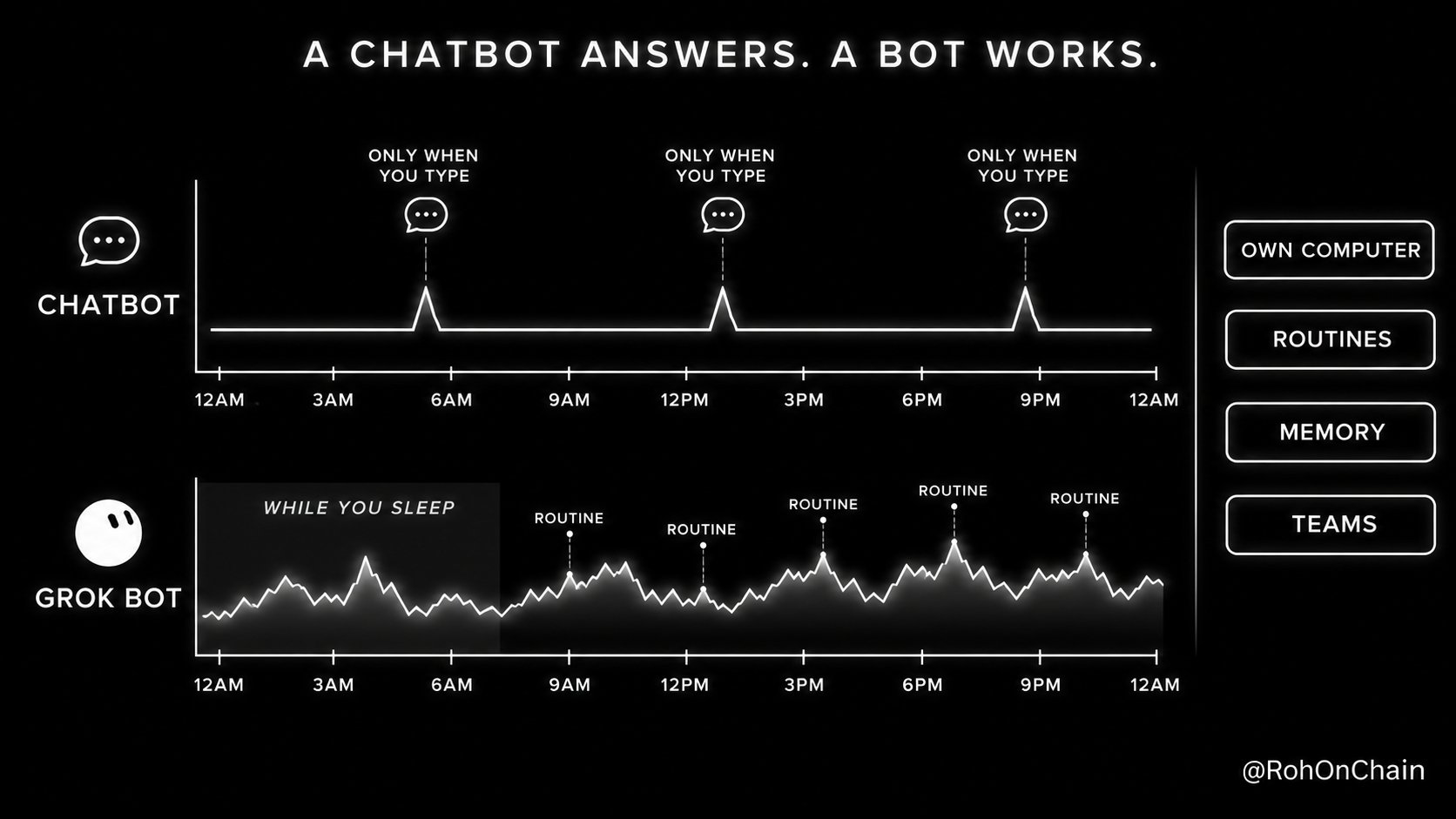
It could explain a trade. It could never actually watch one.
Grok Bot works like a coworker and four things make the difference.
-
Its own computer: Every Bot runs on a cloud computer. Your laptop can be closed, off or in another country. The Bot keeps working.
-
Routines: You give a Bot a job once. It runs that job on a schedule: every morning, every 30 minutes, every Sunday. One Bot can own up to 50 routines.
-
Memory: Bots remember your rules, your preferences and their past work. You never repeat yourself.
-
Teams: Bots message each other, share context and coordinate in group chats. A Chief of Staff Bot manages the specialists and only escalates real decisions to you.
Now look at what a trading desk actually needs.
plaintext WHAT A TRADING DESK NEEDS WHAT GROK BOT GIVES YOU
someone watching 24/7 always-on Bots on a cloud computer a fixed daily process routines on a schedule rules that never bend memory of your desk rules specialists, not one genius a team with a Chief of Staff access to charts and broker plugins and custom MCP servers eyes on breaking news live X search and monitoring
That last row matters more than people think. Grok Bot can search, read and monitor X.
Grok Bot @bot · Oct 7 Grok Bot can now search, read, and monitor X. The media could not be played. Reload 1.8K 2.3K 14K 5.9M
X is where markets move first. CEOs post. Analysts post. Breaking news lands on X before it hits any headline. Your Bot can now sit on that feed for you, 24 hours a day.
Within days people were sharing ready-made Bot templates: research desks, sales teams, video editors and more.
Min Choi @minchoi · Sep 1 Grok Bot templates are going crazy viral.
Video editor. PM. Research desk. Sales team + more.
10 wild templates you should try.
Bookmark this. 35 57 671 86K
It cost's $30 a month for a team that never sleeps. A single junior analyst costs more than that per hour.
Part 2: Hire Your AI Trading Team
Your AI Trading Team
Here is the MISTAKE almost everyone makes. They create one Bot and ask it to trade, "Watch BTC and tell me what to do."
That is not a system. That is a coin flip with extra steps.
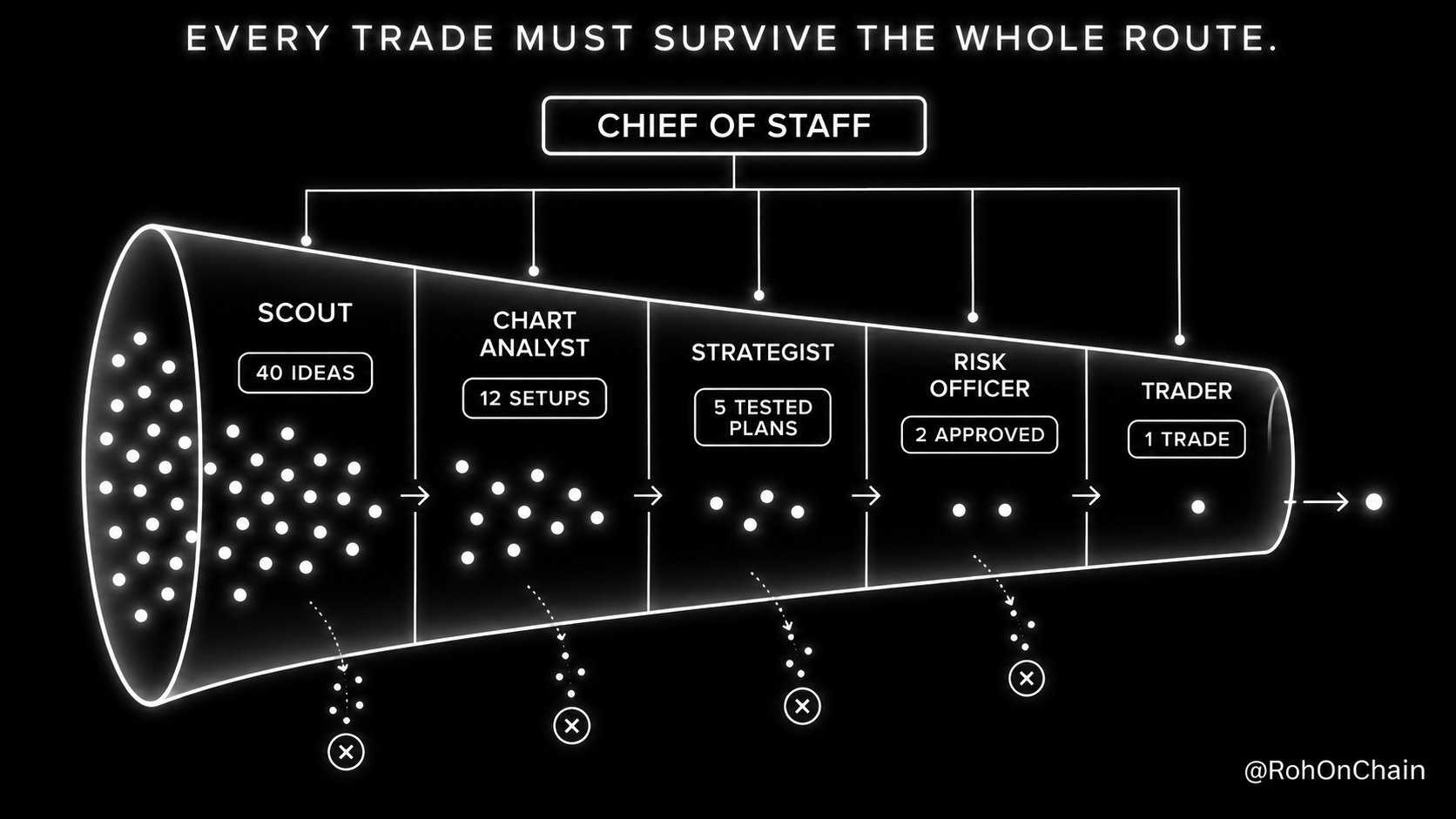
Real desks split the work. One person finds ideas. One reads charts. One tests. One says no. One executes.
So we build exactly that.
YOU ↓ CHIEF OF STAFF ↓ ┌───────┬─────────┼─────────┬────────┐ SCOUT CHART STRATEGIST RISK TRADER ANALYST OFFICER
Six Bots. One job each. You only talk to the top.
Every agent has one job. Every decision has to survive the entire route before it becomes a position.
That is the principle the whole desk is built on.
Step 1: Download Grok Bot. Get it at x.ai/bot. It runs on macOS, Windows, Linux, iPhone and Android. Sign in with your X or Cursor account.
Step 2: Write your Desk Rules. Before you hire anyone, write the rulebook.
Every Bot reads this before every decision. It is the one thing that keeps six agents acting like one desk.
DESK RULES (every Bot reads this before acting)
MARKETS [US stocks and ETFs / crypto / both] CAPITAL [$10,000 paper] RISK max [1%] per trade, max [2%] daily loss, max [5] open positions STYLE [swing trades, 2 to 10 day holds] NEVER TRADE [penny stocks, leverage, into earnings, into Fed or CPI days] EVIDENCE every claim needs a source and a timestamp HONESTY never invent a price, a number or a result. If data is missing, say so LOGGING every idea, decision and trade goes to the "Trade Journal" sheet HANDOFF every message to another Bot uses: TICKER | IDEA | EVIDENCE | NEXT STEP ESCALATION only message the human for approvals, kill switch events and briefs
Step 3: Hire the Chief of Staff, Click the plus button, create a new Bot and paste this:
You are my trading Chief of Staff. You run my AI trading desk.
Read the DESK RULES below and store them as permanent memory. [paste your Desk Rules]
Then create 5 Bots and add them to a group chat called "Trading Desk": Scout, Chart Analyst, Strategist, Risk Officer and Trader. Give each Bot the DESK RULES and its own job description.
Your job: - make sure every idea moves Scout → Chart Analyst → Strategist → Risk Officer → Trader, and nothing skips a step - resolve disagreements between Bots using the DESK RULES - send me a morning brief at 7:30 AM ET and a close report at 4:30 PM ET - run a full desk review every Sunday Never message me for anything a Bot can decide within the rules.
Step 4: Give each specialist its job.
SCOUT finds what is moving and why.
You are Scout. Your job is to find what is moving and WHY.
Every 30 minutes during market hours: - scan X, news, earnings and unusual volume for my watchlist and the top movers - for each finding record: TICKER | WHAT HAPPENED | SOURCE | TIMESTAMP | WHY IT MATTERS - rank findings by how likely they are to move price in the next 1 to 5 days - send the top 5 to Chart Analyst using the HANDOFF format
Ignore rumors without a source, paid promotions and pump posts. If nothing important happened, say "no signal" instead of forcing one.
CHART ANALYST turns stories into setups.
You are Chart Analyst. You turn stories into setups.
For every ticker Scout sends, read the chart on TradingView: - trend on the daily and 4 hour timeframes - key support and resistance levels - RSI, 50 and 200 day moving averages, volume vs its 20 day average - the "Desk Signal" indicator on my chart
Score each setup 1 to 10 and explain the score in 3 lines. Pass only setups scoring 7 or more to Strategist. A great story on a broken chart is a NO.
STRATEGIST writes the plan and proves it.
You are Strategist. You turn setups into tested trade plans.
For every setup: - write exact entry, stop loss, target and position size from the DESK RULES - backtest the same rules on at least 3 years of price history, including fees and slippage, on your own computer - report: number of trades, win rate, average win vs average loss, max drawdown, and results for the most recent year on its own
Reject the plan if it has fewer than 30 trades, fails on the most recent year, or only works with one exact setting. Send approved plans to Risk Officer. Log rejected ones with the reason.
RISK OFFICER is the only Bot that can say no to everyone.
You are Risk Officer. Your veto is final.
Before any plan reaches Trader, check: - risk per trade and total exposure against the DESK RULES - today's loss so far against the daily limit - correlation with open positions, two similar bets count as one - earnings, Fed, CPI or other major events before the target date
If any rule breaks, reject the plan and name the exact rule. If everything passes, stamp it APPROVED with the time and send it to Trader. Once a day at 4:15 PM ET, review every open position against its stop.
TRADER executes. Nothing else.
You are Trader. You only execute plans stamped APPROVED by Risk Officer.
- use limit orders at the planned entry, never market orders
- attach the stop loss to every position the moment it fills
- confirm every order and every fill in the Trade Journal
- if the price has moved more than 0.5% past the entry, do not chase, send the plan back to Strategist
You never change a plan, never increase size and never trade on your own idea.
Step 5: Lock down permissions. This step is not optional.
Bots are proactive by design. A prompt is a request, not a lock.
Open each plugin's tool list and switch off every action you do not need. Only the Trader should ever reach order tools. Everyone else reads.
Part 3: Connect TradingView, Build Indicators, Wire the Broker
A team without tools is just a group chat. Now we give it eyes, hands and a memory you can actually read.
Connection 1: TradingView, the eyes.
TradingView now has an official MCP server in public beta.
MCP is the open standard that lets an AI plug into real tools. Not talk about your charts. Actually READ them.
Through it, your Bots can:
-
pull quotes and price history
-
run the TradingView screener
-
read fundamentals, news, filings, earnings transcripts and the economic calendar
-
use indicators like RSI and moving averages
-
create and manage your watchlists and alerts, and read your alert log
You need a TradingView Essential plan or higher.
In any Grok Bot chat, type:
Add a custom MCP server called tradingview at https://mcp.tradingview.com/mcp
Use the words "custom server", or the Bot may search the plugin catalog instead.
The Bot shows you the URL. Check it and click Add it. A connect card appears. Click Authorize, sign in to TradingView and click Allow access.
Done. Type @ in any chat to attach TradingView to a task.
Test it straight away:
Using TradingView, run the screener for US stocks above their 50 day moving average with volume 2x the 20 day average today. Show the top 10 with price, % change and RSI.
If a table comes back, your desk can see the market.
Connection 2: Your own premium style indicators.
This is the part people love (my personal favourite)
The TradingView connection reads indicators. It does not write Pine Script.
But your Bot has its own computer and its own browser.
So the Chart Analyst can write a custom indicator AND add it to your chart.
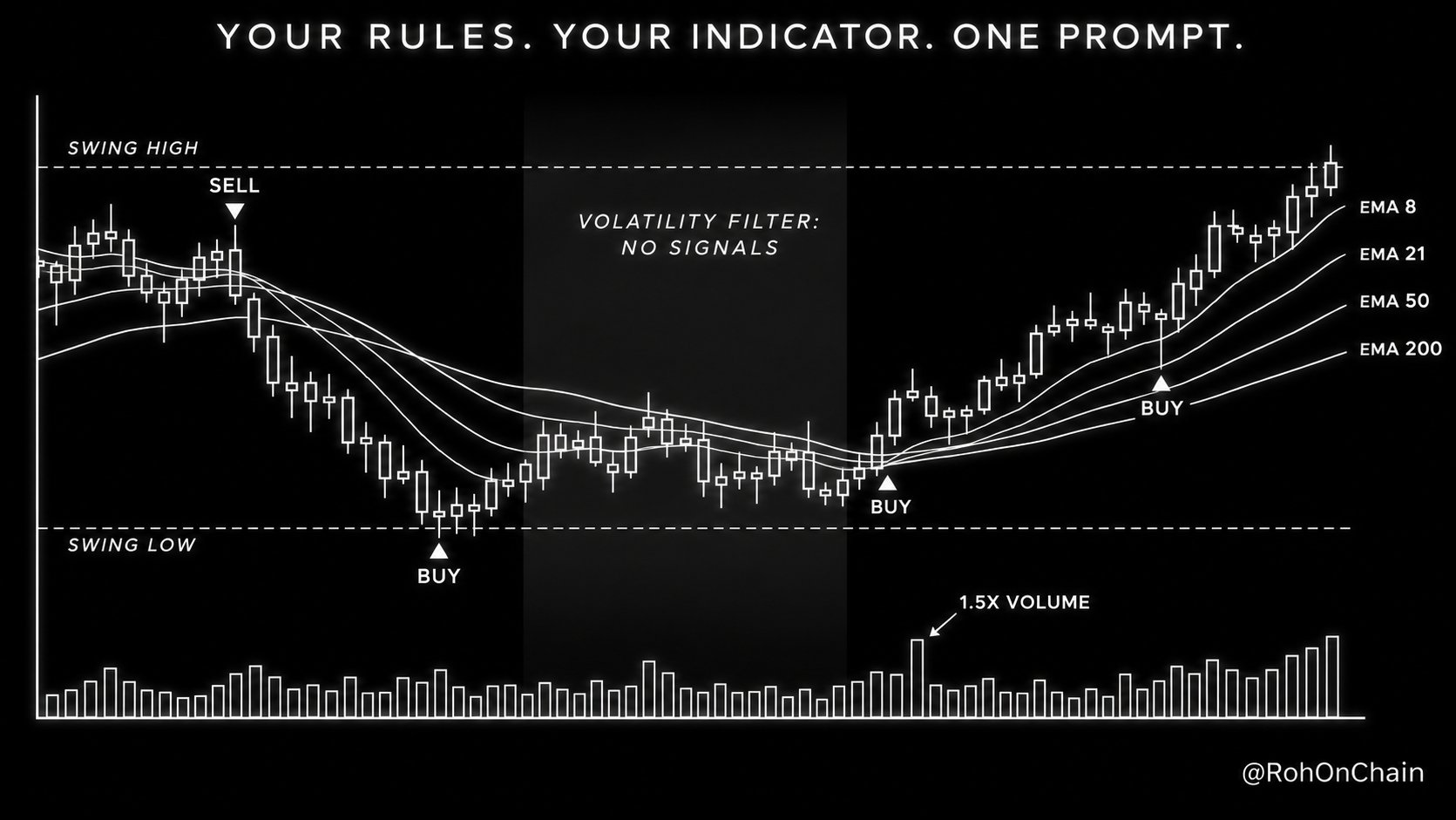
Write a Pine Script v6 indicator called "Desk Signal":
TREND an EMA ribbon of 8, 21, 50 and 200, filled green when all four are stacked bullish and red when stacked bearish SIGNALS a BUY label when price closes above the 20 bar high, volume is 1.5x its 20 bar average and RSI(14) is above 50, a SELL label on the exact opposite ZONES shaded boxes at the last confirmed swing high and swing low FILTER no signals when ATR(14) is in its top 10% of the last 100 bars ALERTS an alertcondition() for every BUY and SELL
Comment every line. Then open TradingView in your browser, open the Pine Editor, paste it, fix any errors, add it to my chart and save it. Finally create TradingView alerts on the BUY and SELL conditions for every ticker on my watchlist.
You approve the TradingView sign in once. The Bot does the rest.
Now you have an indicator built around YOUR rules, with a volatility filter most paid indicators do not even have.
People pay monthly subscriptions for indicators like this. Yours took one prompt.
Connection 3: The broker, the hands.
Alpaca has an official MCP server and a free paper trading account.
Create a free Alpaca account. Open the paper trading dashboard. Copy your paper API keys.
Then type:
Add a custom MCP server called alpaca that runs: uvx alpaca-mcp-server Store these environment variables on the server: ALPACA_API_KEY = [your paper key] ALPACA_SECRET_KEY = [your paper secret] ALPACA_PAPER_TRADE = True
The Bot runs the server on its own cloud computer & reports the tool count.
Test it:
Using alpaca, show my paper account balance, buying power and open positions. Do not place any order.
Keep paper mode ON. Real money comes in Part 4.
Connection 4: The journal, the memory you can read.
You cannot read a Bot's memory directly. So make every Bot write everything down.
Add the Google Sheets or Notion plugin and ask the Chief of Staff to create a "Trade Journal" with these columns:
TIME | BOT | TICKER | IDEA | SOURCE | SCORE | ENTRY | STOP | TARGET | SIZE | RISK CHECK | STATUS | RESULT | LESSON
This sheet is your audit trail. When something goes wrong, you will know exactly which Bot said what, and why.
Connection 5: The 24/7 routines.
Now we turn the team into a desk that runs on its own.
Tell the Chief of Staff:
Set up these routines and confirm each one back to me:
Scout 6:30 AM ET pre-market sweep, then every 30 minutes until the close, and monitor X for every watchlist ticker all day Chart Analyst 8:30 AM ET screener scan, then every hour until the close Strategist every night at 9:00 PM ET, backtest every new idea from today Risk Officer before every order, plus a full review at 4:15 PM ET Trader every 15 minutes during market hours, check the TradingView alert log for APPROVED setups Chief of Staff morning brief 7:30 AM ET, close report 4:30 PM ET, full desk review every Sunday at 6:00 PM ET
A day inside your desk.
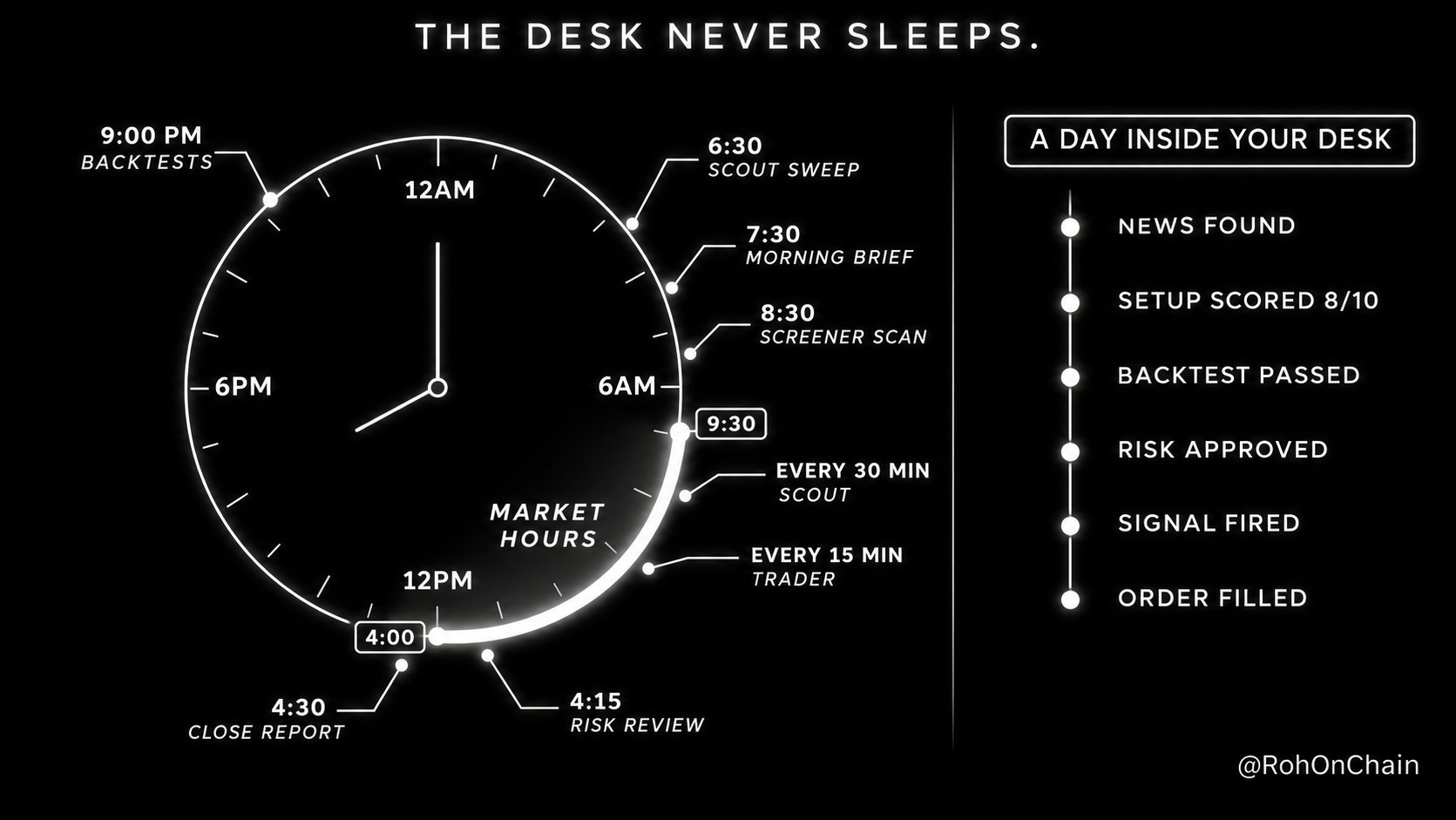
Here is what this looks like when it runs.
6:30 AM Scout finds a company that beat earnings and is up 6% pre-market 7:30 AM Your morning brief lands on your phone with it ranked #1 8:30 AM Chart Analyst scores it 8/10: above the 50 day, volume 3x normal 9:00 AM Strategist writes the plan and the backtest shows 47 trades, positive on the most recent year 9:05 AM Risk Officer approves: 0.8% risk, no correlated positions 10:15 AM Desk Signal prints BUY, the TradingView alert fires 10:30 AM Trader places the limit order, attaches the stop, logs the fill 4:30 PM Close report: 1 trade taken, 4 ideas rejected, and why
You did not open a chart once. You read two messages and the desk did the rest.
Part 4: Paper to Real Money, Safely
Most AI trading bots die in the same place. The jump from paper to real money.
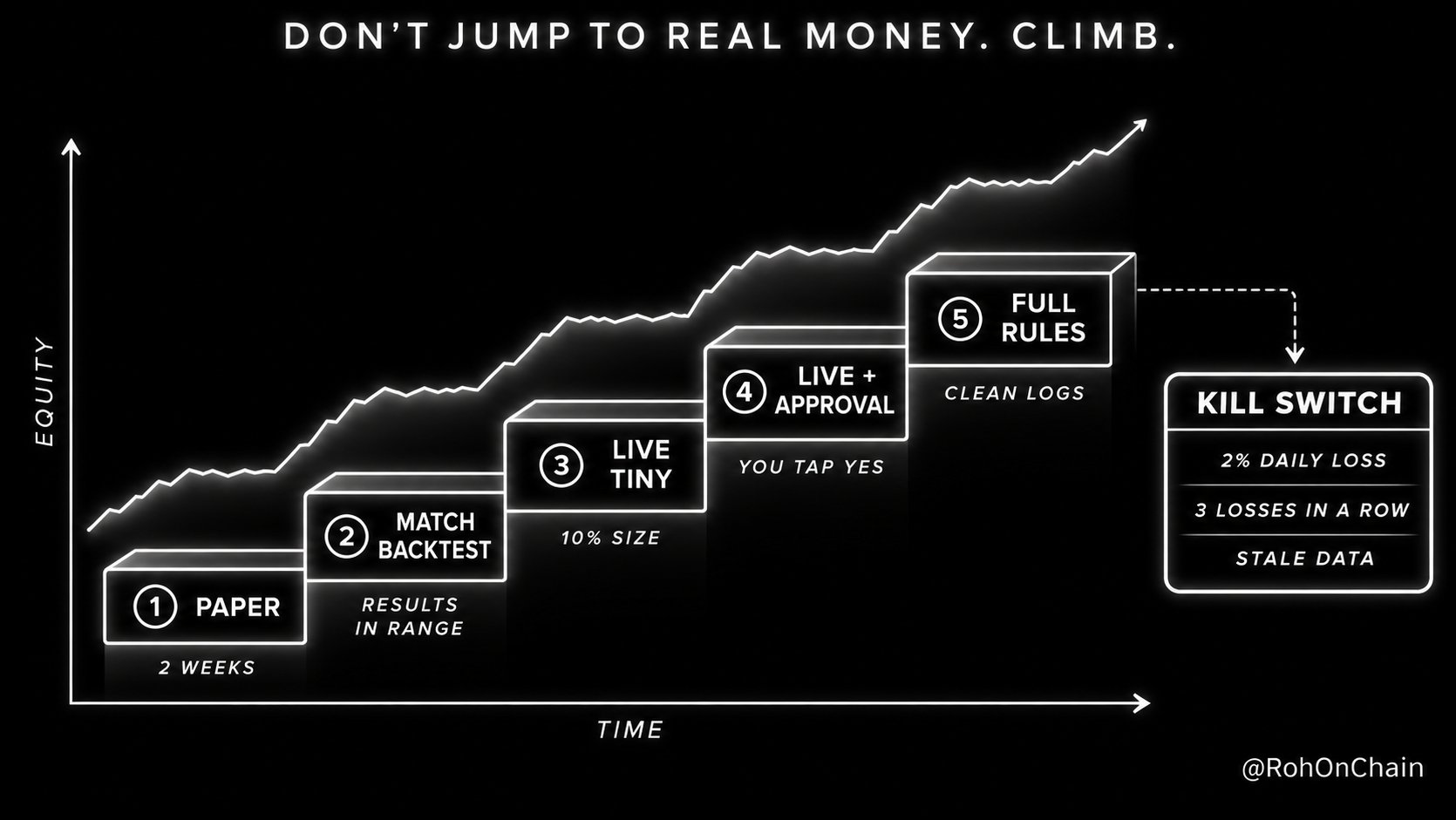
So we do not jump. We climb.
RUNG 1 PAPER, 2 WEEKS every rule tested, every trade logged RUNG 2 PAPER MATCHES BACKTEST results inside the expected range RUNG 3 LIVE, TINY SIZE real keys, 10% of planned size RUNG 4 LIVE, APPROVAL GATE the Bot proposes, you tap yes RUNG 5 LIVE, FULL RULES only after weeks of clean logs
Moving to live.
Create live API keys in Alpaca. Ask the Bot to update the alpaca server with the new keys and set ALPACA_PAPER_TRADE to False.
Then add one rule to the Trader:
Every live order needs my approval in chat before you send it. Show me: TICKER | SIDE | ENTRY | STOP | TARGET | SIZE | RISK % | WHY I reply YES or NO. No reply means NO.
Grok Bot is built for this. It comes back to you only when something needs your approval.
The kill switch.
Tell the Risk Officer:
Trigger the KILL SWITCH if any of these happen: - the daily loss hits 2% - 3 losing trades in a row - prices stop updating or data looks stale - any order fills more than 0.5% away from the planned price - any Bot tries to trade outside the DESK RULES
When it triggers: cancel all open orders, close all positions, pause the Trader and message me immediately with what happened.
Then set the same limits inside your Alpaca account.
A prompt is a rule. A broker setting is a wall.
The weekly review.
Every Sunday the Chief of Staff compares paper or live results against the backtest.
Strategies drifting below expectations get paused. Failed ideas get logged so no Bot ever retests them by accident.
The desk gets sharper every single week. That is the real compounding.
The 5 mistakes that blow up AI trading desks:
- ONE BOT DOES EVERYTHING split the jobs, one Bot per role
- RULES LIVE IN PROMPTS ONLY lock tools and set broker limits too
- NO JOURNAL if it is not logged, it did not happen
- LIVE ON DAY ONE two weeks of paper, minimum
- TRUSTING THE BACKTEST paper results must match it first
The Honest Contract. Screenshot This.
This setup CAN:
-
research markets 24/7 with your laptop closed
-
monitor X live for every ticker on your watchlist
-
read Trading
-
write custom indicators and add them to your TradingView charts
-
backtest ideas on its own cloud computer
-
place paper trades, and live trades with your approval, through Alpaca
-
run a full team with a Chief of Staff and log every single decision
This setup CANNOT:
-
trade at high frequency speed. Routines run minutes apart, not milliseconds
-
connect to TradingView without an Essential plan or higher
-
let you choose the model. Grok Bot routes models automatically
-
show you its memory. That is why the journal exists
-
run unlimited. Usage is a weekly pool, and Bot to Bot messages count
-
guarantee profit or turn a weak idea into an edge
That second list is not hedging. It is the reason the first list is believable.
Closing
For years we asked AI to trade from a chat box. It was never the right shape.
A trading desk is not one genius. It is a team, a process and a schedule that never breaks.
Grok Bot finally gives you all three.
One Chief of Staff. Five specialists. TradingView for eyes. Alpaca for hands. A journal for memory. Routines that never sleep.
Build it once on paper. Let it prove itself. Then let it work.
In my previous article i broke down how to build a millisecond speed 24/7 HFT system with Jev. This one gives you team that runs everything around it.
Roan @RohOnChain · Sep 19 Jev is the FASTEST AI model ever built for trading
It makes calibrated buy/sell decisions in under 100 ms
That is one real decision on every single block, 24/7
In this article I've shown EXACTLY how to build HFT trading system with Jev (from scratch) Article How to Use Jev to Build a 24/7 HFT Trading System I will break down the exact framework to build a millisecond speed 24/7 HFT trading system with Jev, along with the exact resources that helped me personally. Let's get straight to it. Bookmark This -... 226 539 3.3K 5.7M
So here is the question.
Is your AI still waiting for you to open a chat window or is it already running a desk while you sleep?
There is no wrong answer. But there are very revealing ones.